
System
title: "Access Control List (ACL)" ---
Access Control List (ACL)
The ACL submodule of the System module manages role-based authorization for
secured artifacts in the application — primarily UI pages. It records which
roles may read, write, create, delete or administer which artifacts, and
exposes that information to the framework’s security layer through the
AclAuthorizationService contract. It depends on the User submodule
(sys.usr) for roles and users, and on the Localization submodule
(sys.loc) for the user’s locale during sign-in.
Concepts
Object TypeA category of secured artifact. The bootstrap installs a single built-in type called
Page, representing UI page classes that live on the classpath under a configured base package.Object IdentityA concrete secured artifact within an object type — for example, a particular UI page. It is identified by its object type plus an object code, and carries a reference to the underlying Java class.
ACL EntryA row that grants a single
Rolea set of permissions on a singleObject Identity. The five permissions — read, write, create, delete and administer — are independent booleans.RoleDefined by the User submodule (
sys.usr). A user inherits roles directly (throughUserRole) and indirectly through user-group membership (UserGroupMember→UserGroupRole).
Entities
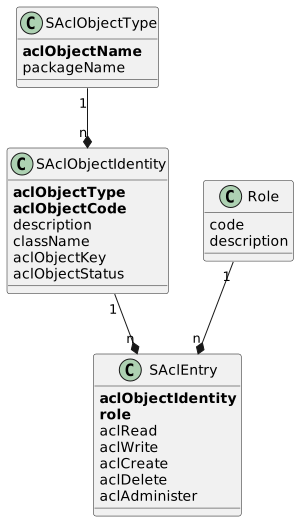
ACL Object Type (SAclObjectType)
Registers a category of secured artifact.
| Field | Description |
|---|---|
Name ( | Unique name of the type (business key). The bootstrap installs |
Package ( | Base Java package that is scanned to discover identities of this type. Optional. |
ACL Object Identity (SAclObjectIdentity)
Represents one secured artifact inside an object type.
| Field | Description |
|---|---|
Object Type ( | Owning object type. Part of the business key. |
Code ( | Code, unique within the object type. Part of the business key. |
Description ( | Short description, up to 30 characters. |
Class Name ( | Fully-qualified Java class name backing the artifact. Optional. |
Object Key ( | Optional domain key used by the remoting layer. |
Status ( | Lifecycle status, see below. Defaults to |
The status is one of:
| Status | Code | Meaning |
|---|---|---|
Draft |
| Newly created identity, not yet validated. |
Valid |
| The class is loadable but no |
Active |
| The class is loadable and at least one |
Invalid |
| The class could not be loaded; the artifact is no longer present on the classpath. |
ACL Entry (SAclEntry)
Grants a Role a set of permissions on a single ACL Object Identity.
The combination (aclObjectIdentity, role) is unique.
| Field | Description |
|---|---|
Object Identity ( | The artifact to which the entry applies. Part of the business key. |
Role ( | The role that receives the permissions. Part of the business key. |
Read ( | Permission to view the artifact. |
Write ( | Permission to modify existing records. |
Create ( | Permission to create new records. |
Delete ( | Permission to delete records. |
Administer ( | Administrative permission, e.g. manage other users' rights. |
All five permission flags are independent booleans (GBoolean); a missing
flag is treated as false.
Functionality
Bootstrap
SYS_ACL_Bootstrap is invoked the first time the default user signs in,
through DefaultAclAuthorizationReaderService.getAclUserDetails. It chains
the bootstraps of the Localization (sys.loc) and User (sys.usr)
submodules and then runs the ACL bootstrap (AclBootstrapService.bootstrap):
If no
ACL Object TypenamedPageexists, it is created with the base packagecom.wercstat.erp.client.AclObjectTypeImportService.importAclObjectIdentitiesis then called to scan that package and seed identities and admin entries.
The constants used during bootstrap are defined in SYS_ACL_Constant:
| Constant | Default value |
|---|---|
|
|
|
|
|
|
Importing object identities
AclObjectTypeImportService.importAclObjectIdentities(hasTrace, aclObjectType)
discovers UI page classes by reflection
(AclReflectionService.findUIPageClassNamesInPackage) within the package
configured on the object type. For every discovered class:
If no
ACL Object Identitywith that class name exists, a new identity is created. ItsCodeis the class' simple name (with a fallback to the fully-qualified name when there is no package suffix), itsDescriptionis the simple name truncated to 30 characters, and itsClass Nameis the fully-qualified name.The default administrator role (
sys_ope) is then granted full permissions — read, write, create, delete and administer — through a newACL Entry, unless one already exists for that identity and role.
The method returns the number of newly-created identities. It is also
invoked from the UI through the aclImportObjects action on the
ACL Object Type view model.
Validating object identities
AclWriterService.validateAclObjectIdentities walks every
ACL Object Identity and tries to load its Class Name:
Class loads, identity has no entries → status set to
Valid.Class loads, identity has entries → status set to
Active.Class fails to load → status set to
Invalid.
The method returns the count of identities marked Invalid. It is invoked
from the UI through the aclValidateObjects action on the
ACL Object Type view model, which then renders either a success message
or an error message containing the invalid count.
Resolving a user’s roles
AclReaderService.getUserRoles(user) returns the union of:
Roles assigned through any
UserGroupMemberthe user belongs to (viaUserGroupRole).Roles assigned directly to the user (via
UserRole).
Roles are returned as their codes (strings).
Authorization queries
DefaultAclAuthorizationReaderService answers the security layer’s
authorization questions. See the Public API section for the contract it
implements; the underlying logic combines ACL Entry rows for the user’s
roles with a logical OR per permission flag — a permission is granted if
any of the user’s roles grants it.
Public API
SYS_ACL_CommandApi and SYS_ACL_QueryApi
Both classes are Spring @Service beans kept as cross-module extension
points but currently expose no operations. Other modules that need ACL
behavior reach in through the AclAuthorizationService contract or the
view model actions described below.
AclAuthorizationService (framework contract)
DefaultAclAuthorizationReaderService implements
io.venlo.frame.server.api.AclAuthorizationService and is the public
entry point for the framework’s security layer.
getAclUserDetails(usercode)Returns an
AclUserDetailscontaining the user’s locale, name, password (encoded for the default user the first time it signs in), archived and locked flags, the union of the user’s roles, default page, default data area and desktop preferences (theme and menu bar). Triggers the database bootstrap on the first sign-in of the default user.getAclObjectTypeEntries(objectType, roleCode)Returns every
ACL Entryof the given role whose identity belongs toobjectType, packaged asAclObjectTypeEntriesalong with the role description and the package name of the object type. Used by management screens that show what a role can do.getAclAuthorizationByClass(objectType, javaClassName, roles)Returns the effective
AclAuthorizationfor a Java class, given the user’s roles. The result combines the entries for all matching roles with a logical OR per permission flag.
View model actions
SAclObjectTypeViewModel exposes two actions on the ACL Object Type
page; both surface as toolbar buttons.
aclImportObjectsRuns
AclObjectTypeImportService.importAclObjectIdentitiesfor the selected object type and reports the number of newly-imported identities through a desktop notification.aclValidateObjectsRuns
AclWriterService.validateAclObjectIdentitiesand reports either "no errors" or the number ofInvalididentities through a desktop notification.
title: "Dynamic Forms (FRM)" ---
Dynamic Forms (FRM)
The frm submodule of sys provides a metadata-driven form and grid system. Administrators define reusable typed properties, group them into schemas, lay them out as forms or grids, and store user-entered data as JSON-backed records that conform to those schemas. It is the backing model for free-form business documents (brand, persona, audience, equipment, inspection, campaign, …) and exposes its schemas to the Venlo Frame as DictionarySchema instances so the rest of the framework can render and validate values uniformly.
Concepts
PropertyA reusable typed value descriptor (text, number, date, enumerate, …). Properties carry the rules that govern a value: string length and case, decimal precision/scale/rounding, default UI dimensions, optional unit of measure, and — for enumerate properties — the allowed options.
SchemaThe structural definition of a record type: an ordered list of fields, each bound to a
Property. A schema corresponds to oneDictionarySchemaat runtime.Schema FieldA named slot inside a schema. It refers to a
Propertyfor typing rules and adds schema-specific concerns: line order, label, tooltip, mandatory/optional status, and an optional LLM-assist prompt used to fill the field automatically.FormA user-interface layout for entering data into a schema. A form is an ordered tree of sections; each section contains form fields that point at schema fields.
GridA user-interface layout for displaying schema data as a table. A grid lists which schema fields appear as columns and in what order.
RecordA concrete instance of a schema. Record values are stored as JSON (
DomainRecordValue); the schema interprets the JSON into typed values.Field StatusWhether a schema field is
Inactive,Mandatory, orOptionalfor data entered against the schema.
Entities
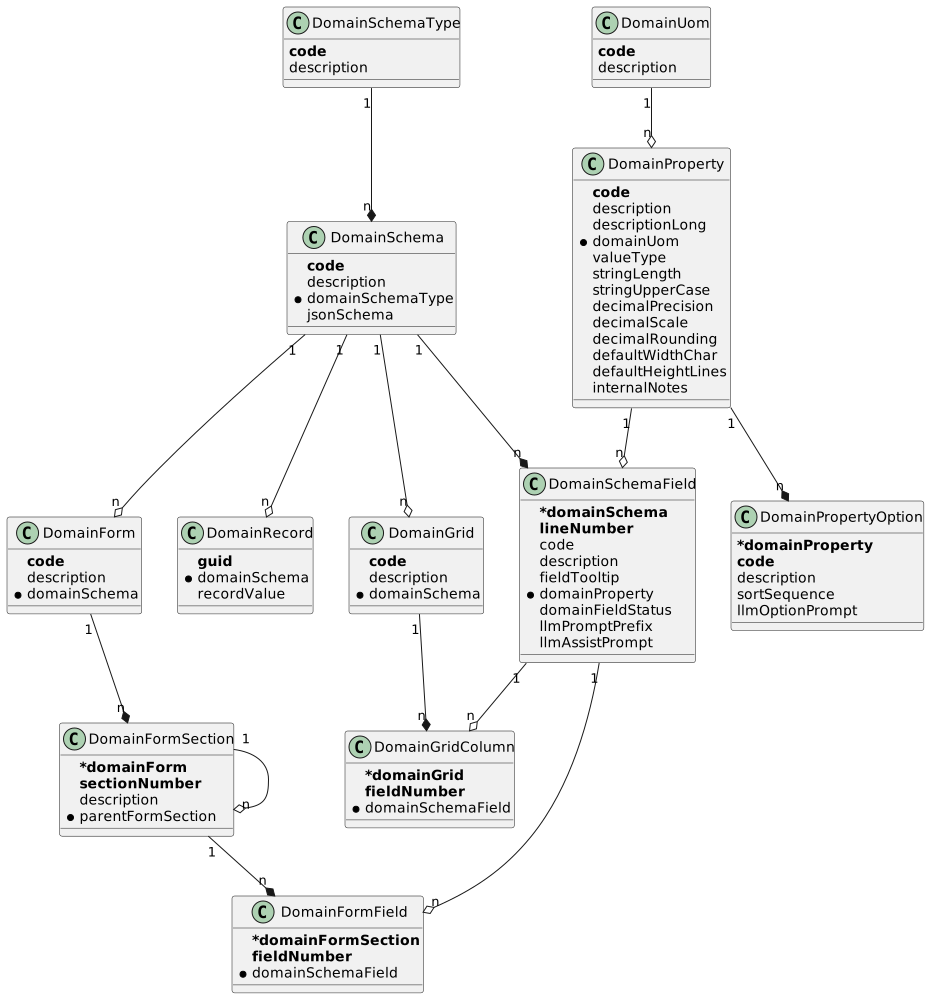
Domain Schema Type (DomainSchemaType)
Top-level category that groups related schemas (for example "marketing", "trade").
| Field | Description |
|---|---|
| Business key (up to 12 characters). |
| Human-readable name. |
Domain Schema (DomainSchema)
The structural definition of a record type. A schema belongs to a DomainSchemaType and owns an ordered set of schema fields. At runtime it is converted to an io.venlo.domain.dictionary.DictionarySchema so the framework can read, write, and validate values.
| Field | Description |
|---|---|
| Business key (up to 12 characters). |
| Human-readable name. |
| Type/category the schema belongs to. |
| Optional JSON Schema document; reserved for external schema export/validation. |
| Operational back-reference to the fields that make up this schema. |
Domain Schema Field (DomainSchemaField)
One field of a schema. It binds a DomainProperty for typing rules and adds schema-specific concerns such as ordering, labels, mandatory/optional status, and LLM-assist prompts.
| Field | Description |
|---|---|
| Owning schema (business key, plus |
| Order of the field within the schema. |
| Field code (up to 24 characters), used as the JSON key in records. |
| Field label shown in forms and grids. |
| Optional tooltip shown next to the field. |
| The typed property providing value rules and (for enumerates) options. |
| Whether the field is inactive, mandatory, or optional. |
| Optional short text prepended to the LLM prompt when this field is filled by AI. |
| Optional full prompt used when an LLM is asked to fill this field for a record. |
The lookup DomainSchema.getField(code) returns the schema field for a given field code, or raises a business exception if it does not exist.
Domain Property (DomainProperty)
A reusable typed value descriptor. Multiple schema fields can share the same property to keep typing rules consistent across schemas.
| Field | Description |
|---|---|
| Business key (up to 12 characters). |
| Short label. |
| Longer description used in tooltips and AI context. |
| Optional unit of measure (e.g. for decimal properties). |
| The kind of value this property holds — see Value Types below. |
| Maximum length for |
| Whether |
| Total digits for |
| Digits after the decimal point for |
| Rounding mode applied to |
| Default editor width in characters (for text-style values). |
| Default editor height in lines (for text-style values). |
| Free-form notes for administrators; not shown to end users. |
Value Types (DomainValueType)
| Code | Name | Meaning |
|---|---|---|
| Boolean | True/false flag. |
| Date | Calendar date. |
| Date Time | Date plus time of day (minute precision). |
| Decimal | Fixed-precision number; uses |
| Enumerate | One value chosen from this property’s |
| Integer | 32-bit integer. |
| Json | Raw JSON value. |
| Long | 64-bit integer. |
| Short | 16-bit integer. |
| String | Single-line text; uses |
| Ascii | Multi-line plain ASCII text. |
| Css | Multi-line CSS source. |
| Html | Multi-line HTML source. |
| JavaScript | Multi-line JavaScript source. |
| Markdown | Multi-line Markdown source. |
| CSV | Multi-line CSV content. |
| Reference | Reference to another entity (reserved; not currently materialized as a record value). |
Domain Property Option (DomainPropertyOption)
An allowed value for an enumerate property. Options also carry an optional LLM prompt that helps an AI assistant pick the option for a field.
| Field | Description |
|---|---|
| Owning property (business key, plus |
| Option code (up to 4 characters), persisted as the field value. |
| Human-readable label for the option. |
| Optional ordering hint for the option list. |
| Optional prompt segment used when an LLM evaluates whether to pick this option. |
Domain Unit of Measure (DomainUom)
A unit attached to numeric or text properties to clarify what the value represents (for example "kg", "%", "min").
| Field | Description |
|---|---|
| Business key (up to 8 characters). |
| Human-readable name. |
Domain Form (DomainForm)
A user-interface layout that captures data for one schema. A form has one or more sections, which can themselves nest.
| Field | Description |
|---|---|
| Business key (up to 12 characters). |
| Human-readable name. |
| The schema whose fields this form lays out. |
Domain Form Section (DomainFormSection)
A section within a form — visually a fieldset/group. Sections can be nested via parentFormSection.
| Field | Description |
|---|---|
| Owning form (business key, plus |
| Order of the section within the form. |
| Section title displayed in the UI. |
| Optional parent section, enabling nested groups. |
Domain Form Field (DomainFormField)
One field placement inside a section. It points at a DomainSchemaField; the section’s order plus fieldNumber determine where it appears on screen.
| Field | Description |
|---|---|
| Owning section (business key, plus |
| Order of the field within the section. |
| The schema field rendered at this position. |
Domain Grid (DomainGrid)
A table layout used to list records of a schema.
| Field | Description |
|---|---|
| Business key (up to 12 characters). |
| Human-readable name. |
| The schema whose fields this grid columns are taken from. |
Domain Grid Column (DomainGridColumn)
One column placement within a grid.
| Field | Description |
|---|---|
| Owning grid (business key, plus |
| Order of the column from left to right. |
| The schema field shown in this column. |
Domain Record (DomainRecord)
A concrete data instance for a schema. The values are stored as JSON in recordValue; the schema interprets the JSON into typed values when the record is read.
| Field | Description |
|---|---|
| Globally-unique business key. |
| The schema this record conforms to. |
| JSON document containing the record’s field values, keyed by schema-field code. |
Domain Field Status (DomainFieldStatus)
| Code | Name | Meaning |
|---|---|---|
| Inactive | The field exists but is hidden from data entry and listings. |
| Mandatory | The field must be filled when entering data. |
| Optional | The field may be left empty. |
Functionality
Schema-to-Dictionary conversion
DomainSchemaConverter.toDictionarySchema(…) (exposed via SYS_FRM_Util.toDictionarySchema) converts a DomainSchema into a Venlo DictionarySchema. For each schema field it derives a typed ValueTypeMeta from the field’s DomainProperty — for example, String properties become a StringMeta carrying the property’s length and upper-case flag, and Decimal properties become a DecimalMeta carrying precision, scale, and rounding mode. The resulting DictionarySchema is what the rest of the framework uses to read, write, and validate record values.
Reference (R) properties are not currently convertible and raise an internal exception if encountered; they are reserved for future cross-entity references.
Domain record creation
DomainRecordWriterService.createDomainRecord(schema, recordValue) creates a new DomainRecord with a fresh GUID, links it to the supplied schema, and persists it. The caller is responsible for producing a JSON DomainRecordValue whose keys match the schema’s field codes.
JSON record-set wrappers
Two helper classes simplify reading and writing record-set JSON in service code:
JsonValueMapListWrapperParses a JSON array of objects into a mutable list of
Map<String, Object>. Provides record-level access by index (getValue,setValue,addRecord) and serialization back to JSON. Used when typing rules are not needed.JsonDictionaryListWrapperWraps a
JsonValueMapListWrapperwith aDictionarySchema.getValueandsetValuego throughDictionaryUIConverterso callers exchange typed Java values (e.g.BigDecimal,LocalDate) instead of raw JSON primitives. This is the standard way to manipulate record values once a schema is available.
LLM-assist prompt construction
DomainSchemaReaderService.createDomainSchemaFieldAssistPrompt(…) is the entry point for building the prompt that asks an LLM to fill a single field of a record, using the field’s llmPromptPrefix, llmAssistPrompt, and any enumerate option’s llmOptionPrompt. The current implementation returns an empty string and is a placeholder for the upcoming LLM-driven form-filling feature.
Public API
SYS_FRM_QueryApi
Read-side facade for other modules.
| Method | Description |
|---|---|
| Returns the schema with the given code, or |
| Same as above but raises a business exception if not found. |
| Delegates to |
SYS_FRM_CommandApi
Write-side facade for other modules.
| Method | Description |
|---|---|
| Persists a new record under the given schema and returns it. |
SYS_FRM_Util
Static utility for converting a DomainSchema to a Venlo DictionarySchema. Used wherever the framework needs to render or validate record values for a schema.
| Method | Description |
|---|---|
| Returns the framework |
SYS_FRM_Constant
Currently contains no constants.
ViewModel actions
The submodule defines view models (DomainSchemaViewModel, DomainPropertyViewModel, DomainFormViewModel, …) for the standard CRUD pages, but does not declare any custom UI actions. There are no buttons specific to this submodule beyond the default toolbar.
title: "LLM Integration (LLM)" ---
LLM Integration (LLM)
The llm submodule of sys provides the metadata, configuration, and runtime services for connecting the ERP to large-language-model providers. It defines what the ERP can ask an LLM to do (LlmAction), who is asking (LlmAgent and LlmApplication), how the LLM should behave (LlmPersona, LlmConfiguration, LlmMemoryStrategy), what extra capabilities it has (LlmSkill, LlmTool, McpClient, LlmDocumentCollection, LlmAdvisor), and records every conversation, message, attachment, and tool call. It depends on sys.frm for input/output DomainSchema definitions and is built on top of Spring AI (ChatClient, ChatMemory, Advisor, ToolCallback, VectorStore) and the Model Context Protocol (McpSyncClient).
Concepts
ActionA repeatable LLM task (e.g. "summarize a brand document", "extract competitors"). An action bundles the model, configuration, persona, memory strategy, prompt text, schemas, skills, tools, MCP clients, document collections, and advisors needed to run the task.
AgentA configured caller of actions. Belongs to an
Applicationand has its own prompt contribution. Each agent has a goal action that defines what it ultimately produces.ApplicationA grouping of agents that share a system prompt — the umbrella product or feature an agent participates in.
PersonaA reusable voice/role prompt (for example "concise editor", "marketing copywriter") that gets prepended to action prompts.
SkillA reusable capability prompt (for example "write SEO-friendly headlines") attached to an action.
ToolA Spring bean that the LLM can invoke as a function call. Each tool entity records the bean name and optional input/output schemas.
MCP ClientAn external Model-Context-Protocol server connection that exposes one or more tools to the LLM.
AdvisorA Spring AI
Advisorbean inserted into the chat-client pipeline, ordered per action. Used for cross-cutting concerns such as logging, caching, or content filtering.Document CollectionA vector-store collection used for retrieval-augmented generation (RAG). Linking a collection to an action wires up a
QuestionAnswerAdvisoragainst that store.Memory StrategyThe chat-memory configuration applied to a conversation (window size, full retention, …).
ConversationOne running instance of an agent calling an action. Owns an ordered stream of messages, attachments, and tool calls and tracks process status, finish reason, token usage, and estimated cost.
Prompt ContributorA common interface (
IsPromptContributor) implemented by entities that contribute a fragment to the assembled system prompt — application, agent, persona, action, skill, MCP client.Question RoleA special message role used when the LLM calls the AskUserQuestion tool to pause the conversation and wait for human input.
Entities
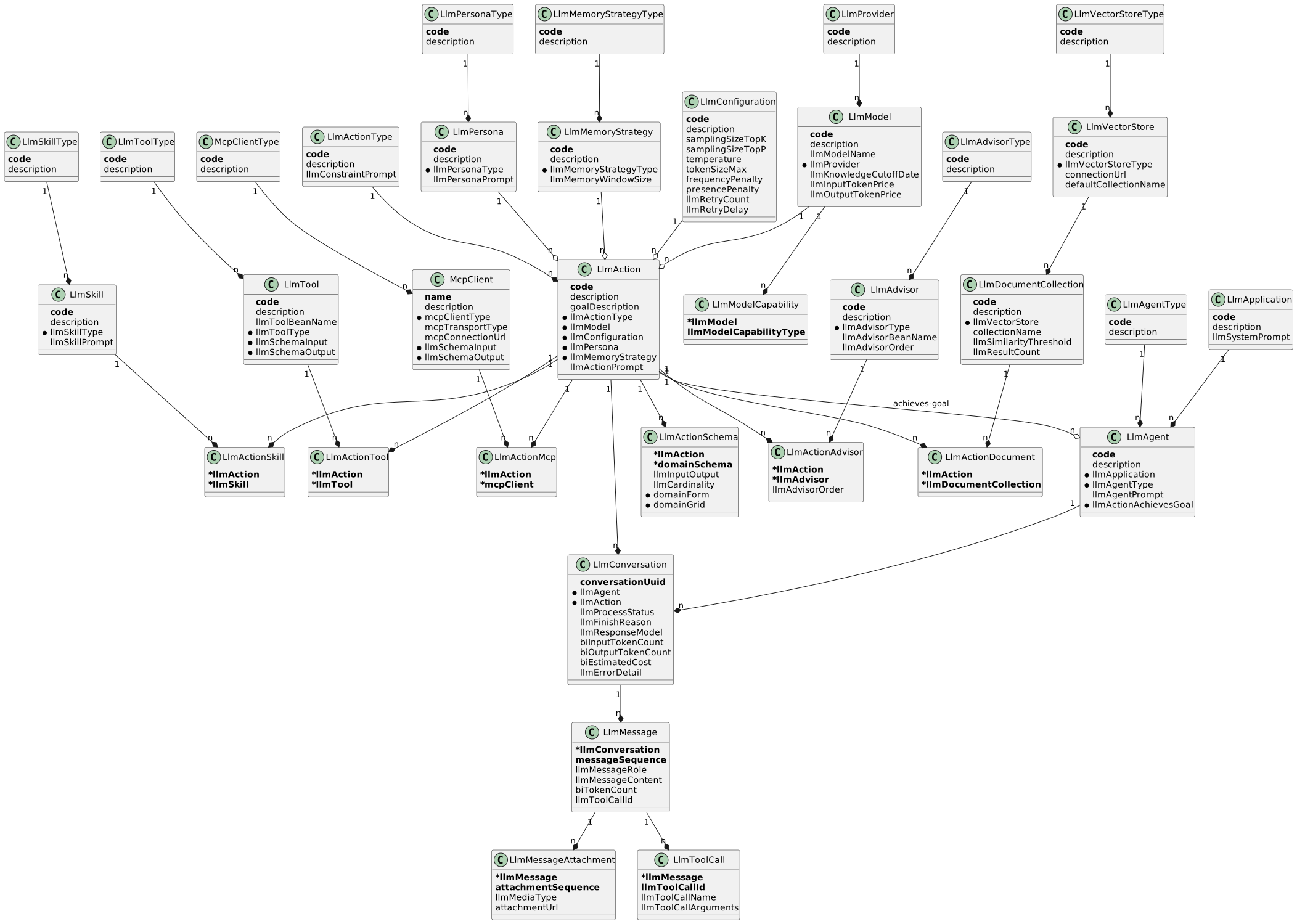
Application (LlmApplication)
The umbrella product/feature whose agents share a base system prompt.
| Field | Description |
|---|---|
| Business key (up to 8 characters). |
| Human-readable name. |
| Optional prompt fragment prepended to every conversation initiated by an agent of this application. |
Agent (LlmAgent)
A configured caller within an application; runs actions to achieve a goal.
| Field | Description |
|---|---|
| Business key (up to 8 characters). |
| Human-readable name. |
| Owning application. |
| Classification of the agent. |
| Prompt fragment that describes the agent’s role. |
| The action whose successful completion satisfies the agent’s goal. |
Agent Type (LlmAgentType)
Classification used to group agents (for example "human", "autonomous", "review").
| Field | Description |
|---|---|
| Business key (up to 4 characters). |
| Human-readable label. |
Action (LlmAction)
A repeatable LLM task. An action bundles all the metadata Spring AI needs to build a ChatClient: the model, configuration, persona, memory strategy, prompt text, plus the link tables for schemas, skills, tools, MCP clients, document collections, and advisors.
| Field | Description |
|---|---|
| Business key (up to 12 characters). |
| Human-readable name. |
| Optional plain-language goal of the action. |
| Classification (Generate, Plan, Reflect, …). |
| The LLM model to call. |
| Sampling, temperature, token limits, and retry settings. |
| Voice/role applied to the assistant. |
| Optional chat-memory configuration; absent means no memory. |
| Optional task-specific prompt fragment. |
The hand-written entity adds the helpers getInputSchemas() (returns input/memory schemas) and getOutputAgentSchema() (returns the single output schema or raises a business exception if zero or many exist).
Action Type (LlmActionType)
Classification with an optional global constraint prompt that is added to every action of that type.
| Field | Description |
|---|---|
| Business key (up to 4 characters). |
| Human-readable label. |
| Optional constraint text appended to action prompts of this type. |
Action Schema (LlmActionSchema)
Links an action to a DomainSchema for either input, output, or memory data, with cardinality and optional UI hints.
| Field | Description |
|---|---|
| Owning action (composite business key with |
| The schema describing the data shape. |
| Whether this schema is consumed ( |
| Whether the data is a single item ( |
| Optional form layout for entering this data. |
| Optional grid layout for displaying this data. |
A validation rule enforces that, when a domainForm or domainGrid is given, it must reference the same domainSchema as this row.
Input/Output (LlmInputOutput)
| Code | Name | Meaning |
|---|---|---|
| Input | Data the LLM consumes. |
| Output | Data the LLM produces. |
| From Memory | Data sourced from chat memory or RAG context. |
Cardinality (LlmCardinality)
| Code | Name | Meaning |
|---|---|---|
| Item | A single record. |
| List | A list of records. |
Action Skill / Tool / MCP / Advisor / Document Links
These are pure link tables that attach reusable capabilities to an action.
LlmActionSkilllinks a skill (prompt fragment) to an action.
LlmActionToollinks a tool (Spring bean) to an action.
LlmActionMcplinks an MCP client (external tool server) to an action.
LlmActionAdvisorlinks an advisor (Spring AI advisor bean) to an action with an explicit ordering.
LlmActionDocumentlinks a RAG document collection to an action.
| Field | Description |
|---|---|
| Owning action; combined with the second key field forms the business key. |
| Order in which this advisor runs in the chat-client pipeline; resolved descending. |
Persona (LlmPersona) and Persona Type (LlmPersonaType)
Persona provides the voice/role prompt fragment.
| Field | Description |
|---|---|
| Business key (up to 8 characters; type uses 4). |
| Human-readable label. |
| Classification of the persona. |
| Prompt fragment that gets injected into the system prompt. |
Skill (LlmSkill) and Skill Type (LlmSkillType)
Skill is a reusable capability prompt added to actions through LlmActionSkill.
| Field | Description |
|---|---|
| Business key (up to 8 characters; type uses 4). |
| Human-readable label. |
| Classification of the skill. |
| Capability description; emitted as |
Tool (LlmTool) and Tool Type (LlmToolType)
Tool maps a Spring bean to a function the LLM can call.
| Field | Description |
|---|---|
| Business key (up to 12 characters). |
| Human-readable label shown to the LLM. |
| Name of the Spring bean that implements the tool callback. |
| Classification of the tool. |
| Optional input |
| Optional output |
MCP Client (McpClient) and MCP Client Type (McpClientType)
MCP client describes a Model-Context-Protocol server connection that exposes one or more tools.
| Field | Description |
|---|---|
| Business key (the MCP client’s name). |
| Human-readable description; used as the prompt contribution. |
| Classification of the MCP client. |
| Transport mechanism — see Transport Types below. |
| Optional connection URL (used for |
| Schema describing the MCP request payload. |
| Schema describing the MCP response payload. |
Transport Types (McpTransportType)
| Code | Name | Meaning |
|---|---|---|
| Stdio | Local process launched via stdio. |
| Streamable HTTP | HTTP transport with streamable response framing. |
| Server-Sent Events | HTTP transport using SSE. |
Advisor (LlmAdvisor) and Advisor Type (LlmAdvisorType)
Advisor declares a Spring AI advisor bean that can be inserted into the chat-client pipeline of an action.
| Field | Description |
|---|---|
| Business key (up to 8 characters; type uses 4). |
| Human-readable label. |
| Classification of the advisor. |
| Spring bean name that resolves to a |
| Default ordering hint for the advisor. |
Document Collection / Vector Store
These three entities configure RAG sources.
LlmDocumentCollectiona named collection inside a vector store, with similarity threshold and result count.
LlmVectorStorea vector store endpoint (and
LlmVectorStoreTypeclassifies the engine).
| Field | Description |
|---|---|
| Business key (up to 8 characters). |
| Human-readable label. |
| Backing vector store. |
| Collection name inside the store. |
| Optional similarity cut-off for retrieval. |
| Optional top-K result count. |
| Classification of the vector store. |
| Optional URL of the store. |
| Optional default collection name. |
Memory Strategy (LlmMemoryStrategy) and Memory Strategy Type (LlmMemoryStrategyType)
Memory strategy controls how chat history is retained for a conversation.
| Field | Description |
|---|---|
| Business key (up to 4 characters). |
| Human-readable label. |
| Strategy classification (e.g. |
| Number of messages retained in the rolling window. |
Configuration (LlmConfiguration)
Sampling, temperature, token-limit, and retry settings applied when building chat options.
| Field | Description |
|---|---|
| Business key (up to 4 characters). |
| Human-readable label. |
| Optional top-K sampling. |
| Optional top-P (nucleus) sampling. |
| Optional temperature. |
| Mandatory output token limit. |
| Optional frequency penalty. |
| Optional presence penalty. |
| Optional retry count for transient failures. |
| Optional delay between retries. |
Model (LlmModel) and Provider (LlmProvider)
Model identifies a specific LLM offered by a provider; provider is the vendor (Anthropic, OpenAI, …).
| Field | Description |
|---|---|
| Business key (up to 12 characters; provider uses 4). |
| Human-readable label. |
| Vendor model identifier passed to the API (e.g. |
| The vendor offering the model. |
| The model’s training cutoff date. |
| Price per input token, used for cost estimation. |
| Price per output token, used for cost estimation. |
Model Capability (LlmModelCapability)
Lists what a model is capable of (link table on the model, keyed by capability type).
Capability Types (LlmModelCapabilityType)
| Code | Name | Meaning |
|---|---|---|
| Function Calling | Supports tool/function calls. |
| Vision | Accepts image input. |
| Streaming | Supports streaming responses. |
| JSON Mode | Can be forced to emit valid JSON. |
| Embedding | Can produce embedding vectors. |
| Audio | Accepts or produces audio. |
Conversation (LlmConversation)
One running instance of an agent calling an action. The conversation aggregates its messages, attachments, and tool calls and tracks lifecycle, finish reason, token usage, estimated cost, and any error detail.
| Field | Description |
|---|---|
| Globally-unique business key. |
| Agent that started the conversation. |
| Action being executed. |
| Lifecycle state — see Process Status below. |
| Optional reason the model stopped — see Finish Reason below. |
| Model name actually used in the response. |
| Calculated input-token total (business-information field). |
| Calculated output-token total (business-information field). |
| Estimated cost from token counts and model pricing (business-information field). |
| Captured error message when the conversation fails. |
Process Status (LlmProcessStatus)
| Code | Name | Meaning |
|---|---|---|
| Not started | Initial state after creation. |
| Running | The model is currently being called. |
| Completed | The action finished successfully. |
| Failed | The action raised an exception. |
| Terminated | The conversation was ended early. |
| Killed | The conversation was forcibly stopped. |
| Stuck | The conversation appears to be hung. |
| Waiting | Paused waiting for user input via the AskUserQuestion tool. |
| Paused | Paused administratively. |
Finish Reason (LlmFinishReason)
| Code | Name | Meaning |
|---|---|---|
| Stop | Model produced a normal stop token. |
| Length | Output truncated by the token limit. |
| Content Filter | Output blocked by a safety filter. |
| Tool Calls | Stopped to emit one or more tool calls. |
| Other | Any other reason reported by the provider. |
Message (LlmMessage)
One entry in a conversation’s transcript. Messages are recorded as immutable events ordered by messageSequence.
| Field | Description |
|---|---|
| Owning conversation. |
| Per-conversation message ordinal. |
| Who or what produced the message — see Message Roles below. |
| Message body. |
| Calculated tokens for this message. |
| Optional tool-call id when this message is a tool response. |
Message Roles (LlmMessageRole)
| Code | Name | Meaning |
|---|---|---|
| System | System prompt. |
| User | Human user input. |
| Assistant | LLM-generated response. |
| Tool | Output of a tool call returning to the LLM. |
| Question | The LLM is asking the user a structured question via the AskUserQuestion tool. |
Message Attachment (LlmMessageAttachment)
A file attached to a message (image, document, …). Stored as an immutable event.
| Field | Description |
|---|---|
| Owning message. |
| Order of the attachment within the message. |
| MIME type / category of the attached resource. |
| URL pointing to the attachment content. |
Tool Call (LlmToolCall)
A function call the LLM emitted during a message.
| Field | Description |
|---|---|
| Owning assistant message. |
| Provider-supplied tool-call id. |
| Name of the tool the LLM asked to invoke. |
| Optional JSON arguments supplied to the tool. |
Functionality
System-prompt assembly
LlmPromptAssemblyService builds the system prompt that is sent on every conversation. It concatenates contributions from the agent’s application, the agent itself, the action’s persona, every linked skill, every linked MCP client, the schema-prompt block (input/output data structures), and finally the action’s own prompt. Each contribution comes from IsPromptContributor.getPromptContribution() — implemented by LlmApplication, LlmAgent, LlmPersona, LlmSkill, McpClient, and LlmAction. Skills and MCP entries get short labels (Your skill: …, Available tool '<name>': …) before their text so the LLM can distinguish them.
Schema-prompt building
LlmActionSchemaPromptService walks the action’s LlmActionSchema rows and produces an "Input data structure:" / "Output data structure:" block describing each schema’s fields. It is used as one segment of the assembled system prompt so the model knows the shape of the data it must consume and produce.
Chat-options building
LlmChatOptionsFactory translates an action’s LlmConfiguration into a Spring AI ChatOptions (model name, max tokens, temperature, top-K, top-P, frequency penalty, presence penalty). Optional values are only set on the builder when present.
Chat-client construction
LlmChatClientFactory is the central wiring point. For each conversation it produces a Spring AI ChatClient configured with: the model bean for the action’s model, the assembled system prompt, the chat options, the resolved tool callbacks plus a per-conversation AskUserQuestion tool, the resolved advisors (action advisors + RAG advisors + a chat-memory advisor when a memory strategy is set), and any MCP tool callbacks. The resulting client is what LlmConversationService calls into.
Tool-callback resolution
LlmToolCallbackResolver looks up each LlmActionTool by its llmToolBeanName in the Spring application context and verifies that the bean is a ToolCallback. It supports an exclude set so the per-conversation AskUserQuestion callback can be inserted separately.
Advisor resolution
LlmAdvisorResolver reads LlmActionAdvisor rows ordered by llmAdvisorOrder and looks up each llmAdvisorBeanName in the Spring context. The resulting list of Advisor instances is added to the chat-client pipeline.
Document-collection (RAG) resolution
LlmDocumentCollectionResolver walks the action’s LlmActionDocument rows. For each linked LlmDocumentCollection it looks up the matching VectorStore bean (by the vector store’s code) and creates a QuestionAnswerAdvisor configured with the collection’s similarity threshold and result count. The default top-K is 4 when not specified on the collection.
MCP-client resolution
LlmMcpClientResolver opens (and caches) one McpSyncClient per McpClient entity, choosing the transport (stdio, streamable HTTP, or SSE) based on mcpTransportType and the mcpConnectionUrl. Each connected client is wrapped in a SyncMcpToolCallbackProvider whose tool callbacks are merged into the chat client. Connections are kept across conversations and closed during shutdown.
Chat memory
LlmMemoryService materializes a ChatMemory per conversation based on the action’s LlmMemoryStrategy. FULL strategy uses an unbounded MessageWindowChatMemory; any other strategy uses a window of llmMemoryWindowSize messages. Memories are cached by conversation id and can be cleared explicitly.
Conversation execution
LlmConversationService is the primary entry point for running an action. startConversation creates a LlmConversation row with a fresh GUID. sendMessage / sendMessageWithAttachments records the user message (and any attachments), flips the conversation to RUNNING, builds a chat client, and calls the model. On success it records the assistant message, persists every emitted tool call, captures token usage and estimated cost (using the model’s input/output token prices), and marks the conversation COMPLETED with the appropriate finish reason. On failure it records the error detail and marks the conversation FAILED.
Human-in-the-loop questions
LlmAskUserQuestionService together with ErpAskUserQuestionHandler implements the AskUserQuestion pattern. When the LLM calls the AskUserQuestion tool, the handler thread blocks on a CompletableFuture for up to five minutes while the conversation status is set to WAITING and a question message (role QU, falling back to TO if the generator has not yet produced the QU code) is persisted. A separate API call (submitAnswers) resolves the future and unblocks the handler so the LLM can continue. Each conversation gets its own handler instance, bound to its conversation id.
Public API
SYS_LLM_QueryApi
Read-side facade used by other modules and the UI.
| Method | Description |
|---|---|
| All |
| Action by business key, or |
| Agent by business key, or |
| Conversation by uuid, or |
| Messages of a conversation in sequence. |
| Tool by business key, or |
| MCP client by name, or |
| The most recent question message for a conversation in |
SYS_LLM_CommandApi
Write-side facade used by other modules and the UI.
| Method | Description |
|---|---|
| Creates a new conversation in |
| Posts a user message and runs the LLM; returns the assistant text or |
| Same as |
| Resolves a |
IsPromptContributor extension
IsPromptContributor is the public seam for entities that contribute a fragment to the assembled system prompt. The submodule itself implements it on LlmApplication, LlmAgent, LlmPersona, LlmAction, LlmSkill, and McpClient. Other modules that introduce their own LLM-aware entities can implement the same interface to plug into prompt assembly.
AskUserQuestion handler
ErpAskUserQuestionHandler implements the framework’s io.venlo.frame.server.ai.tools.AskUserQuestionHandler. It is constructed per conversation by LlmChatClientFactory and forwards the LLM’s structured question payload to LlmAskUserQuestionService.waitForUserAnswers, blocking until submitAnswers is called.
ViewModel actions
The submodule defines view models for the standard CRUD pages on every entity but does not declare any custom UI actions. Conversations, messages, tool calls, and attachments are surfaced as event streams under their parent conversation.
title: "Localization (LOC)" ---
Localization (LOC)
The loc submodule of sys provides the reference data for places, currencies, and language/locale settings used everywhere else in the ERP — currencies, languages, regions, countries (with EU/embargo and AML markers), country regions, locales, and time zones. It owns no business processes; it seeds the defaults at bootstrap and exposes lookups to other modules.
Concepts
CurrencyA monetary unit identified by an ISO-style 3-letter code.
LanguageA spoken/written language identified by an ISO-style 3-letter code.
RegionA high-level grouping of countries (e.g. "Europe", "Asia").
CountryA nation-state, attached to a default currency, language, and region. Carries EU-membership, telephone prefix, unit-of-measure system, trade restriction, and the AML risk classification used when assessing counterparties.
Country RegionA subdivision inside a country (state, province, or administrative region).
LocaleA language/country/variant combination used to format dates, numbers, and text for a user (e.g.
en-GB).Time ZoneA named zone identified by a short code and the corresponding IANA
ZoneId(e.g.Europe/Amsterdam).
Entities
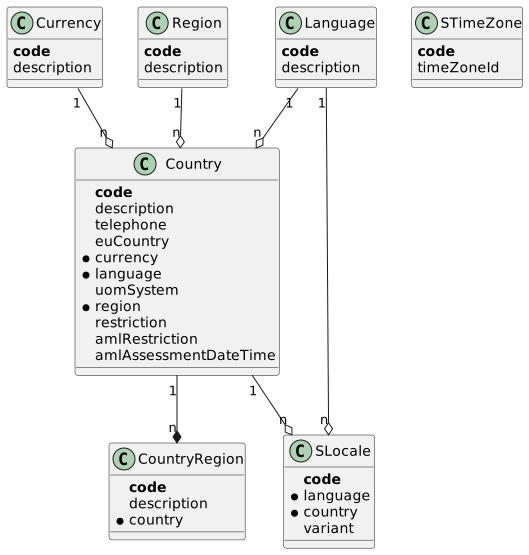
Currency (Currency)
A monetary unit. Used as the default currency on countries and as the trading currency throughout the ERP.
| Field | Description |
|---|---|
| ISO-style 3-letter business key. |
| Human-readable name. |
Language (Language)
A spoken/written language. Used to localize user-facing text and as the default language on countries and locales.
| Field | Description |
|---|---|
| ISO-style 3-letter business key. |
| Human-readable name. |
Region (Region)
A high-level group of countries.
| Field | Description |
|---|---|
| Business key (up to 8 characters). |
| Human-readable name. |
Country (Country)
A nation-state. Carries the defaults for currency, language, region, and unit-of-measure system, plus the trade and AML markers used when transacting with parties from this country.
| Field | Description |
|---|---|
| Business key (up to 8 characters). |
| Human-readable name. |
| Optional international telephone prefix (e.g. |
| Optional EU-membership flag. |
| Default currency for the country. |
| Default language for the country. |
| Unit-of-measure system used in the country — see Unit Systems below. |
| Region the country belongs to. |
| Trade restriction marker — see Country Restrictions below. |
| Anti-money-laundering risk classification — see AML Country Restrictions below. |
| Optional timestamp of the most recent AML risk assessment. |
Country Restrictions (CountryRestriction)
| Code | Name | Meaning |
|---|---|---|
| None | No trade restriction. |
| Embargo | The country is under embargo; trading is blocked. |
| Embargo Warning | The country has been flagged for an embargo warning. |
Unit Systems (UomSystem)
| Code | Name | Meaning |
|---|---|---|
| Metric | Metric system (SI units). |
| Imperial | Imperial system. |
| USA Measure | US customary system. |
AML Country Restrictions (AmlCountryRestriction)
| Code | Name | Meaning |
|---|---|---|
| None | No AML restriction. |
| Embargo | AML embargo applies. |
| Embargo Warning | AML embargo warning. |
| Unknown | AML status has not been assessed yet. |
Country Region (CountryRegion)
A subdivision of a country (state, province, …).
| Field | Description |
|---|---|
| Business key (up to 8 characters). |
| Human-readable name. |
| Owning country. |
Locale (SLocale)
A language/country/variant combination used to format text, numbers, and dates for users.
| Field | Description |
|---|---|
| Business key (up to 12 characters, e.g. |
| Language portion of the locale. |
| Country portion of the locale. |
| Optional locale variant (e.g. |
Time Zone (STimeZone)
A named time zone keyed by a short code and resolved to a ZoneId.
| Field | Description |
|---|---|
| Business key (up to 8 characters, e.g. |
| IANA zone identifier (e.g. |
Functionality
Bootstrap of default reference data
SYS_LOC_BootstrapApi.bootstrap runs at system bootstrap and idempotently inserts a baseline set of localization records when they are missing: a default currency, language, region, country, locale, and time zone. The values are the constants on SYS_LOC_Constant (see Defaults below) and existing records are never overwritten — the bootstrap only creates what is not already there. Other modules can rely on these defaults being present after startup.
Defaults
| Constant | Value | Used for |
|---|---|---|
|
| Default currency. |
|
| |
|
| Default language. |
|
| |
|
| Default region. |
|
| |
|
| Default country. |
|
| |
|
| Default locale. |
|
| Default time-zone code. |
|
| Default time-zone IANA id. |
Currency lookup with mandatory variant
CurrencyReaderService exposes both an optional and a mandatory currency lookup by code. The mandatory variant raises a business exception when the code does not exist and is the seam used by other modules that cannot proceed without a known currency. All other entities are read directly through their generated readers.
Public API
SYS_LOC_QueryApi
Read-side facade.
| Method | Description |
|---|---|
| Locale by code, or |
| Time zone by code, or |
| Language by code, or |
| Currency by code, or |
| Currency by code; raises a business exception if not found. |
SYS_LOC_CommandApi
Currently an empty placeholder — no cross-module write operations are exposed. Other modules treat localization data as read-only at runtime.
SYS_LOC_BootstrapApi
Single entry point bootstrap(HasTrace) — see Bootstrap of default reference data above. Called by the system-wide bootstrap sequence, not by end users.
ViewModel actions
The submodule defines view models for the standard CRUD pages on every entity but does not declare any custom UI actions. Localization data is maintained through the default toolbar.
title: "Scripts and Styles (SCR)" ---
Scripts and Styles (SCR)
The scr submodule of sys lets administrators define small named scripts (typically JavaScript predicates) that other parts of the ERP can evaluate at runtime, plus reusable CSS class definitions for theming. Scripts are compiled and executed inside an embedded GraalVM polyglot context; compiled forms are cached so repeated evaluations stay fast. The submodule has no dependencies on other ERP modules.
Concepts
Script TypeA reference type that names a scripting language (for example
jsfor JavaScript). Every script belongs to exactly one script type and is compiled in that language.ScriptA named, persisted source-code fragment that can be compiled and executed by other parts of the system. Scripts also expose a derived status (compiled, exception, archived) used in the UI.
Script PredicateA script invoked through the public command API with a list of arguments, returning a boolean (or any other type the caller asks for). Scripts written for predicate evaluation typically end with a function that takes those arguments.
StyleA named pointer to a CSS class. Used by other modules to attach a stable, business-meaningful name (e.g. "highlightUrgent") to a CSS class defined in the front-end.
Compilation CacheAn in-memory cache of compiled scripts keyed by script code. Saving or recompiling a script clears its entry so the next evaluation picks up the new source.
Entities
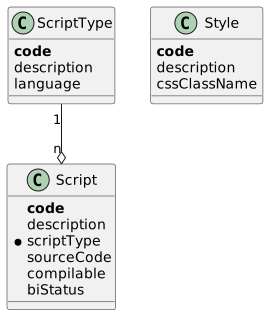
Script Type (ScriptType)
A reference type that names the scripting language used by the scripts of this type.
| Field | Description |
|---|---|
| Business key (up to 6 characters). |
| Human-readable name. |
| GraalVM language identifier passed to the polyglot context (defaults to |
Script (Script)
A named source-code fragment. The hand-written entity recalculates biStatus whenever the script is marked compilable or archived, so the UI always shows the current state without a separate refresh.
| Field | Description |
|---|---|
| Business key (up to 12 characters). |
| Human-readable name. |
| The language/type the source is written in. |
| The script body. Stored as text ( |
| Operational flag set to |
| Derived status — see Script Status below. Recalculated automatically; not editable. |
Script Status (ScriptStatus)
| Code | Name | Meaning |
|---|---|---|
| Compiled | The script compiled successfully on its last attempt. |
| Exception | The last compile attempt raised an error; details are surfaced in the UI when the user re-runs |
| Archived | The script has been archived and is no longer evaluated. |
Style (Style)
A named pointer to a CSS class. Other modules reference styles by their code so the visual styling can be changed without touching business code.
| Field | Description |
|---|---|
| Business key (up to 12 characters). |
| Human-readable name. |
| Name of the CSS class that the front-end applies wherever this style is referenced. |
Functionality
Script compilation
ScriptEvaluateService.compile compiles a script’s source through a single shared GraalVM Context configured with js and allowAllAccess(true). On success the service stores the compiled Value under the script’s code in the in-memory cache and flips the script’s compilable flag to true; on a PolyglotException the flag goes to false and the exception is captured in the returned CompilationResultDto. The service never throws compilation errors itself — callers that need to fail loudly read CompilationResultDto.getException().
Compiled-script cache
The cache is an in-memory map keyed by Code12. compile consults it before re-compiling when called with useCache = true. The cache can be cleared per-script (clearCache(Code12)) — used by the Compile UI action so a fresh compile follows a source-code change — or entirely (clearCache()).
Predicate execution
ScriptEvaluateService.executePredicate compiles the script (using the cache by default) and then invokes the resulting Value with the supplied arguments. The single-argument variant returns a Boolean; the typed variant accepts a target class so callers can request any type the JavaScript expression returns. Compilation or runtime errors are wrapped in an internal business exception that names the script’s code.
Compile UI action
The Compile action on ScriptViewModel clears the cache entry for the script being viewed, recompiles its source from the entity, and shows either a success message or the captured PolyglotException in the desktop message area. The action is always enabled.
Public API
SYS_SCR_QueryApi
This submodule does not expose a dedicated query API class. Scripts and styles are read directly through the standard generated readers when needed, and the only outward-facing call — predicate evaluation — sits on the command API instead.
SYS_SCR_CommandApi
Cross-module facade. Both methods delegate to ScriptEvaluateService.executePredicate with useCache = true.
| Method | Description |
|---|---|
| Compiles and runs the script as a boolean predicate; throws an internal business exception on compile or runtime errors. |
| Same, but returns the script’s result coerced to the supplied target class. |
IsCompilable extension
IsCompilable is the seam used by the compile pipeline. It is implemented by Script (via the entity itself) and by ScriptViewModel (via the view model). Other modules that introduce their own script-like entity can implement the same interface to plug into ScriptEvaluateService.compile and ScriptCompileUtil.compile without inheriting from Script.
ViewModel actions
| Action | User-visible effect |
|---|---|
| Clears the compilation cache for the current script, re-compiles its source, and shows a success message or the compile-time exception. |
title: "Units of Measure (UOM)" ---
Units of Measure (UOM)
The uom submodule of sys is a pure-Java library for parsing, comparing, and converting quantities expressed in SI and imperial units of measure. It supports compound expressions such as kg/m3 and prefixed units such as mm or kPa, and provides domain-specific helpers for the dimensions/mass calculations used by the inventory and trade modules. It owns no database tables, has no Spring services, and depends only on the framework’s HasTrace and BusinessException types.
Concepts
Unit symbolThe textual code that names a unit (e.g.
kg,m,lb,°C). Each unit has one or more accepted aliases — for example liter accepts bothLandl.SI base unitOne of nine "anchors" that every other unit reduces to: pieces, percentage, ampere, candela, kelvin, gram, meter, mole, second. Two units can be converted into one another only when they share a base unit signature.
Unit prefixAn SI multiplier prefix attached to a unit symbol (
p,n,μ/u,m,c,d,da,h,k,M,G,T). Prefixes are recognised on parse and folded into the conversion factor.Single unitA parsed unit symbol that may carry a prefix and an integer exponent (e.g.
m3,kg,m^-1).Compound unitTwo single units multiplied or divided to form a quantity, parsed from a string such as
kg/m3org m^-3. Compound units always have exactly two components in this submodule.QuantityA
(value, unit-code)pair. The pieces variant additionally tracks how many discrete pieces make up the value.Operation typeAdd, subtract, multiply, or divide — used by the calculation utilities when combining two quantities.
Entities
The uom submodule does not persist anything. Its "entities" are immutable in-memory value types and enums used by the rest of the ERP. The diagram below shows how they fit together.
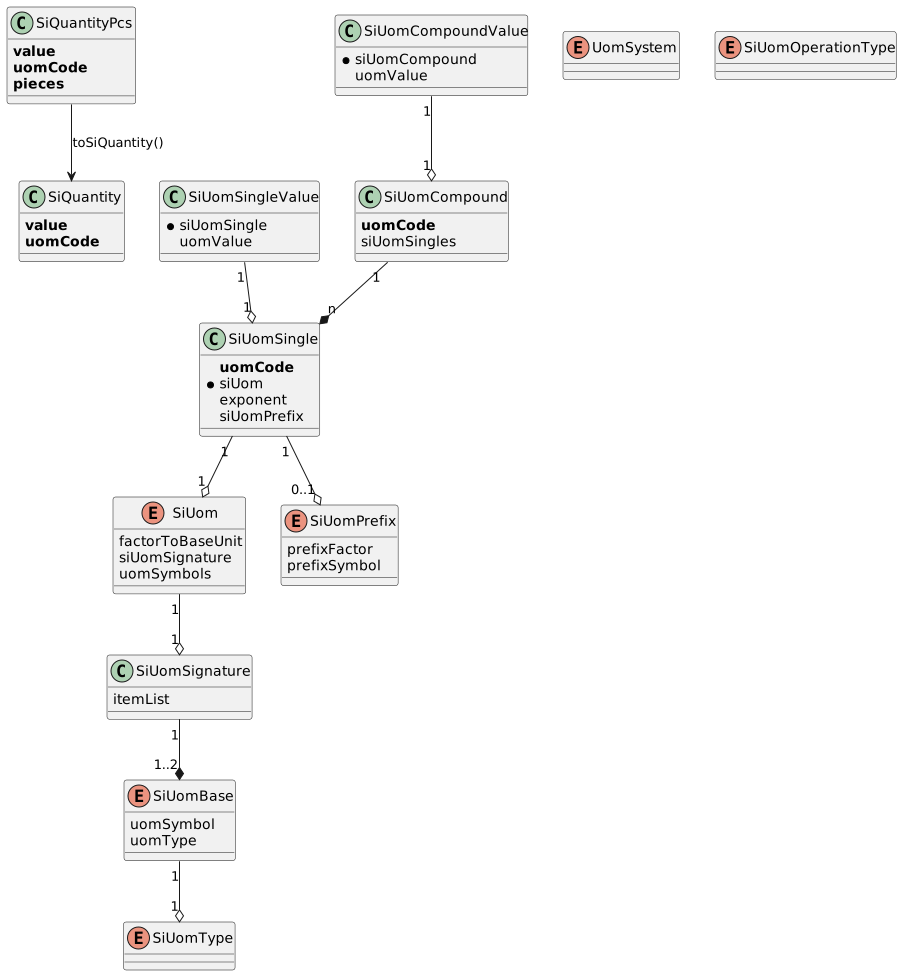
Quantity (SiQuantity)
Immutable record holding a value paired with a unit-of-measure code. Carries assertion helpers (assertHasUomType, assertHasUomTypeAndExponent) so callers can verify that a quantity is in the expected dimension before using it.
| Field | Description |
|---|---|
| Numeric magnitude. |
| Unit code, e.g. |
Pieces Quantity (SiQuantityPcs)
Quantity that additionally tracks a piece count. Used when an item is sold by weight or volume but also exists as discrete units (for example "5 kg comprising 20 pieces"). toSiQuantity() strips the piece count when only the dimensional part is needed.
| Field | Description |
|---|---|
| Numeric magnitude. |
| Unit code. |
| Discrete piece count. |
Compound Unit (SiUomCompound)
A parsed two-component compound unit such as kg/m3 or g m^-3. Instances are cached by uomCode for the lifetime of the JVM since parsing is pure.
| Field | Description |
|---|---|
| The original compound unit string. |
| Two |
Compound Value (SiUomCompoundValue)
A compound unit paired with a numeric value, used as the result of compound conversions.
| Field | Description |
|---|---|
| The compound unit. |
| Numeric magnitude expressed in that compound unit. |
Single Unit (SiUomSingle)
A single parsed unit, optionally prefixed and exponentiated. Cached by uomCode.
| Field | Description |
|---|---|
| The original unit string (e.g. |
| The matching |
| Integer exponent applied to the unit. |
| Optional SI prefix folded into the conversion factor. |
Single Value (SiUomSingleValue)
A single unit paired with a numeric value, used as the result of single-unit conversions.
| Field | Description |
|---|---|
| The single unit. |
| Numeric magnitude expressed in that unit. |
Unit (SiUom)
Enum listing every unit the submodule recognises (PCS, AMPERE, CANDELA, KELVIN, CENTIGRADE, GRAM, TONNE, METER, LITER, MOLE, SECOND, plus imperial: FAHRENHEIT, OUNCE, POUND, STONE, TON, INCH, FOOT, YARD, FURLONG, MILE, FLUID_OUNCE, GALLON). Each value carries its conversion factor to its base unit, its base-unit signature, and the symbols accepted on parse.
Unit Signature (SiUomSignature)
The base-unit fingerprint of a SiUom. Two units are convertible only when their signatures match. A signature is a list of (SiUomBase, exponent) items — typically one item, with two used for compound-derived units.
Base Unit (SiUomBase)
Enum of the nine base units the system reduces everything to. Each base value carries a symbol and the dimensional SiUomType it represents.
| Code | Symbol | Type |
|---|---|---|
|
|
|
|
|
|
|
|
|
|
|
|
|
|
|
|
|
|
|
|
|
|
|
|
|
|
|
Dimension (SiUomType)
Enum naming the physical dimension a base unit measures.
| Value | Meaning |
|---|---|
| Discrete count. |
| Dimensionless percentage. |
| Duration. |
| Length, area (exp 2), volume (exp 3). |
| Mass. |
| Electric current. |
| Temperature. |
| Substance amount in moles. |
| Luminous intensity. |
Prefix (SiUomPrefix)
Enum listing the SI prefixes recognised on parse, with their decimal multipliers and symbols.
| Value | Symbol | Multiplier |
|---|---|---|
|
| 1e-12 |
|
| 1e-9 |
|
| 1e-6 |
|
| 1e-6 |
|
| 1e-3 |
|
| 1e-2 |
|
| 1e-1 |
|
| 1e1 |
|
| 1e2 |
|
| 1e3 |
|
| 1e6 |
|
| 1e9 |
|
| 1e12 |
Unit System (UomSystem)
METRIC or IMPERIAL — used by callers that want to pick a unit set for a country or product class.
Operation Type (SiUomOperationType)
ADD, SUBTRACT, MULTIPLY, DIVIDE — selects the arithmetic combination performed by SiUomCalculationUtil.calculateQuantities.
Functionality
Single-unit conversion
SiUomSingleUomUtil converts a SiQuantity (or a raw value/uomCode pair) between two single-unit codes. The conversion goes through the base unit: the source value is reduced to its base via the unit’s factorToBaseUnit and prefix multiplier, then expanded into the target. convertToSiUomIfConvertable returns null instead of raising when the dimensions do not match — useful when callers want to fall through to an alternative.
Compound-unit conversion
SiUomCompoundUtil.convertToSiUomBase parses a compound unit code such as kg/m3 into two SiUomSingle components, requires that the first component has a non-negative exponent and the second a non-positive exponent, and reduces the value to the equivalent base-unit compound (e.g. g/m3). Compound units with shapes other than two components raise a business exception.
Quantity arithmetic
SiUomCalculationUtil.calculateQuantities adds, subtracts, multiplies, or divides two SiQuantity values whose base units agree, returning the result expressed in a caller-supplied target unit. Both quantities are first reduced to their base unit so that, for example, 1 kg + 500 g returns the expected mass. Division by zero raises a business exception.
Domain calculations
The same utility class hosts higher-level helpers used by the trade and inventory flows:
calculateLengthByDimensions(weight, width, thickness, specificWeight)Solves
length [m] = weight / (width × thickness × specificWeight). Asserts that the inputs have the right dimensions before computing.calculateMassByDimensions(length, width, thickness, specificWeight)Solves
mass [g] = length × width × thickness × specificWeight.calculateMassBySquareLength(squareLength, thickness, specificWeight)Solves
mass [g] = squareLength × thickness × specificWeightfor callers that already have an area.calculateSpecificWeight(weight, width, length, thickness, outputUom)Computes specific weight in
g/m3from a mass and a rectangular volume. Currently the onlyoutputUomaccepted isg/m3; other targets raise an internal exception (tracked under REAL-771).
Dimension assertions
SiUomUtil.assertHasUomTypeAndExponent and the matching helpers on SiQuantity raise a business exception when a quantity’s dimension or exponent does not match the expected one. They are used pervasively at the entry of every calculation helper so failures point at the offending input.
Unit parsing
SiUomPreprocessor rewrites convenience forms before parsing: it splits a numerator/denominator compound, expands trailing-digit forms (m2 → m^2, m3 → m^3), and applies a negative exponent sign to the denominator. The parsed forms feed both SiUomSingle.of and SiUomCompound.of, both of which cache their results.
Public API
SYS_UOM_QueryApi and SYS_UOM_CommandApi
The submodule does not provide a query or command API class. Other modules call the static utility classes directly:
| Class | Purpose |
|---|---|
| Convert a |
| Reduce a compound-unit quantity (e.g. |
| Add/subtract/multiply/divide quantities, plus dimension/mass/specific-weight calculations for trade and inventory flows. |
| Immutable value types used as input and output of every utility above. |
| Enum supplied to |
ViewModel actions
The submodule does not expose any UI; it is consumed exclusively from server-side code. There are no view models or actions to document.
Bootstrap
There is no bootstrap class — the recognised units, prefixes, and base units are declared as Java enums and are available from JVM start without any database state.
title: "Users, Roles and Groups (USR)" ---
Users, Roles and Groups (USR)
The usr submodule of sys owns the people who can sign in and the groupings that drive authorization: users, user types, roles, and user groups, plus the link tables that bind them. It seeds a default admin user, group, and role at bootstrap, exposes the logged-in and batch-job users to the rest of the system, and provides the dynamic UI for ticking groups and roles per user. It depends on sys.loc for the locale and time-zone defaults attached to a new user, and on sys.acl only as a downstream consumer of roles.
Concepts
UserA person (or technical agent) who can authenticate and act in the system. Each user has a code that doubles as the Spring Security username, a password, locale and time-zone, plus UI preferences.
User TypeA classification of users that carries the default page shown after sign-in.
RoleA named permission grouping. The
aclsubmodule grants object-level access to roles; this submodule defines the role identities themselves.User GroupA named group of users. A user inherits every role attached to every group it is a member of.
User RoleDirect assignment of a role to an individual user — used when role membership should not flow through a group.
User Group RoleA role attached to a group; every member of the group inherits the role.
User Group MemberA user’s membership in a group.
Logged-in UserThe user resolved from the current Spring Security context. Used by every action that needs to know "who is doing this".
Batch Job UserThe technical user the system signs in as when running background jobs that have no human session. Its credentials are read from properties.
Entities
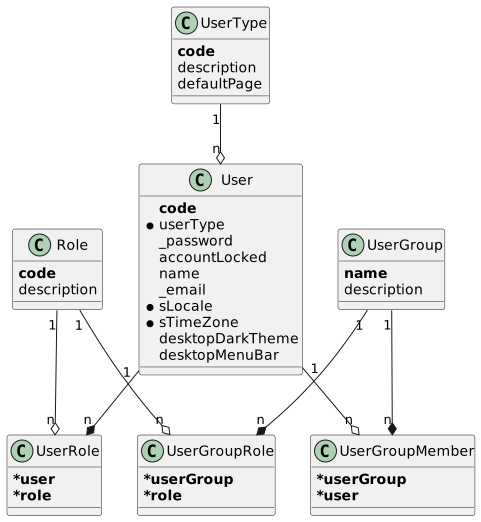
User Type (UserType)
A classification of users.
| Field | Description |
|---|---|
| Business key (up to 8 characters). |
| Human-readable name. |
| Optional default page (an |
User (User)
A user account.
| Field | Description |
|---|---|
| Business key — also the Spring Security username. |
| The user’s classification. |
| Optional encrypted password. Stored encoded by the framework’s |
| Whether sign-in is blocked. |
| Display name. |
| Optional email address. |
| Locale used to format dates/numbers/text for this user. |
| Time zone used to display timestamps for this user. |
| Preference flag: dark vs. light desktop theme. Default |
| Preference flag: show or hide the desktop menu bar. Default |
Role (Role)
A named permission grouping. Used by the acl submodule to grant object access; this submodule only stores the role identities.
| Field | Description |
|---|---|
| Business key (a |
| Human-readable name. |
User Group (UserGroup)
A group whose members all share its assigned roles.
| Field | Description |
|---|---|
| Business key (a |
| Human-readable description. |
User Role (UserRole)
Direct role assignment to an individual user.
| Field | Description |
|---|---|
| Owning user (composite business key with |
| The role assigned. |
User Group Role (UserGroupRole)
Role attached to a group. Every member of the group inherits the role.
| Field | Description |
|---|---|
| Owning group (composite business key with |
| The role attached to the group. |
User Group Member (UserGroupMember)
User membership in a group.
| Field | Description |
|---|---|
| Owning group (composite business key with |
| The member user. |
Functionality
Bootstrap of default user, group, and role
SYS_USR_BootstrapApi.bootstrap runs at system bootstrap and idempotently provisions a baseline set of records when they are missing: a default UserType (001), a default User (admin), a default UserGroup (001), a default Role (sys_ope), and the UserGroupMember and UserGroupRole rows that bind the admin user to the group and the role to the group. Existing records are never overwritten. The bootstrap pulls the default locale and time zone from sys.loc and fails fast if those are missing.
The defaults that govern this step are constants on SYS_USR_Constant:
| Constant | Value |
|---|---|
|
|
|
|
|
|
|
|
|
|
|
|
Logged-in user resolution
UserReaderService.getLoggedInUser reads the current username from the Spring Security context (VenloContext.getUserDetails()) and looks up the matching User row. It raises a business exception when the username does not resolve to a user — used by every action that needs to attribute work to "the current user" (audit fields, theme preferences, etc.).
Batch-job user sign-in
BatchUserReaderService provides the technical user the system runs as for background jobs that have no interactive session. loginBatchJobUser registers the configured batch-job credentials with VenloContext.setBackgroundUserDetails; getBatchJobUser returns the corresponding User entity. Credentials come from SystemSettingService, which reads the erp.sys.usr.batchJobUserName and erp.sys.usr.batchJobPassword properties and trims them.
UI preference toggles
UserPreferenceViewModel exposes two actions that flip the dark-theme preference on the currently logged-in user. Both actions are always enabled and persist immediately — the user does not need to save the preference page.
| Action | Effect |
|---|---|
| Sets |
| Sets |
Dynamic group-role and group-member matrices
Two view models render a dynamic checkbox matrix so administrators can manage role and group bindings without scrolling through long lists of link rows:
UserGroupViewModel_RolesBuilds one boolean field per
Roleon the user-group edit page. Loading a user group ticks the boxes that match itsUserGroupRolerows; saving the record removes every existing role binding for the group and re-creates them from the ticked boxes.UserViewModel_GroupMembersBuilds one boolean field per
UserGroupon the user edit page. Loading a user ticks the boxes that match itsUserGroupMemberrows; saving rewrites the user’s group memberships from the ticked boxes. Password edits go through Spring Security’sPasswordEncoderbefore being persisted.
Public API
SYS_USR_QueryApi
Read-side facade.
| Method | Description |
|---|---|
| Signs the runtime in as the batch-job technical user. |
| Returns the batch-job technical user. |
| Returns the user matching the current Spring Security session. |
| User by primary id. |
| User by code, or |
| Role by code, or |
| Direct role assignments for a user. |
| Members of a group. |
| Group memberships of a user. |
| Roles attached to a group. |
SYS_USR_CommandApi
Currently an empty placeholder — no cross-module write operations are exposed. User and group records are maintained through their default UI pages and the dynamic matrix view models.
SYS_USR_BootstrapApi
Single entry point bootstrap(HasTrace) — see Bootstrap of default user, group, and role above. Called by the system-wide bootstrap sequence, not by end users.
ViewModel actions
| Action | User-visible effect |
|---|---|
| Switches the desktop UI to the dark theme for the current user. |
| Switches the desktop UI to the light theme for the current user. |