
Scripts and Styles (SCR)
The scr submodule of sys lets administrators define small named scripts (typically JavaScript predicates) that other parts of the ERP can evaluate at runtime, plus reusable CSS class definitions for theming. Scripts are compiled and executed inside an embedded GraalVM polyglot context; compiled forms are cached so repeated evaluations stay fast. The submodule has no dependencies on other ERP modules.
Concepts
Script TypeA reference type that names a scripting language (for example
jsfor JavaScript). Every script belongs to exactly one script type and is compiled in that language.ScriptA named, persisted source-code fragment that can be compiled and executed by other parts of the system. Scripts also expose a derived status (compiled, exception, archived) used in the UI.
Script PredicateA script invoked through the public command API with a list of arguments, returning a boolean (or any other type the caller asks for). Scripts written for predicate evaluation typically end with a function that takes those arguments.
StyleA named pointer to a CSS class. Used by other modules to attach a stable, business-meaningful name (e.g. "highlightUrgent") to a CSS class defined in the front-end.
Compilation CacheAn in-memory cache of compiled scripts keyed by script code. Saving or recompiling a script clears its entry so the next evaluation picks up the new source.
Entities
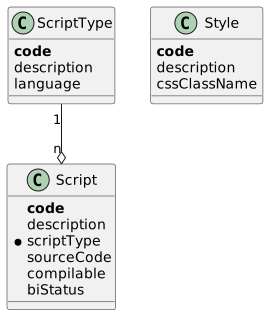
Script Type (ScriptType)
A reference type that names the scripting language used by the scripts of this type.
| Field | Description |
|---|---|
| Business key (up to 6 characters). |
| Human-readable name. |
| GraalVM language identifier passed to the polyglot context (defaults to |
Script (Script)
A named source-code fragment. The hand-written entity recalculates biStatus whenever the script is marked compilable or archived, so the UI always shows the current state without a separate refresh.
| Field | Description |
|---|---|
| Business key (up to 12 characters). |
| Human-readable name. |
| The language/type the source is written in. |
| The script body. Stored as text ( |
| Operational flag set to |
| Derived status — see Script Status below. Recalculated automatically; not editable. |
Script Status (ScriptStatus)
| Code | Name | Meaning |
|---|---|---|
| Compiled | The script compiled successfully on its last attempt. |
| Exception | The last compile attempt raised an error; details are surfaced in the UI when the user re-runs |
| Archived | The script has been archived and is no longer evaluated. |
Style (Style)
A named pointer to a CSS class. Other modules reference styles by their code so the visual styling can be changed without touching business code.
| Field | Description |
|---|---|
| Business key (up to 12 characters). |
| Human-readable name. |
| Name of the CSS class that the front-end applies wherever this style is referenced. |
Functionality
Script compilation
ScriptEvaluateService.compile compiles a script’s source through a single shared GraalVM Context configured with js and allowAllAccess(true). On success the service stores the compiled Value under the script’s code in the in-memory cache and flips the script’s compilable flag to true; on a PolyglotException the flag goes to false and the exception is captured in the returned CompilationResultDto. The service never throws compilation errors itself — callers that need to fail loudly read CompilationResultDto.getException().
Compiled-script cache
The cache is an in-memory map keyed by Code12. compile consults it before re-compiling when called with useCache = true. The cache can be cleared per-script (clearCache(Code12)) — used by the Compile UI action so a fresh compile follows a source-code change — or entirely (clearCache()).
Predicate execution
ScriptEvaluateService.executePredicate compiles the script (using the cache by default) and then invokes the resulting Value with the supplied arguments. The single-argument variant returns a Boolean; the typed variant accepts a target class so callers can request any type the JavaScript expression returns. Compilation or runtime errors are wrapped in an internal business exception that names the script’s code.
Compile UI action
The Compile action on ScriptViewModel clears the cache entry for the script being viewed, recompiles its source from the entity, and shows either a success message or the captured PolyglotException in the desktop message area. The action is always enabled.
Public API
SYS_SCR_QueryApi
This submodule does not expose a dedicated query API class. Scripts and styles are read directly through the standard generated readers when needed, and the only outward-facing call — predicate evaluation — sits on the command API instead.
SYS_SCR_CommandApi
Cross-module facade. Both methods delegate to ScriptEvaluateService.executePredicate with useCache = true.
| Method | Description |
|---|---|
| Compiles and runs the script as a boolean predicate; throws an internal business exception on compile or runtime errors. |
| Same, but returns the script’s result coerced to the supplied target class. |
IsCompilable extension
IsCompilable is the seam used by the compile pipeline. It is implemented by Script (via the entity itself) and by ScriptViewModel (via the view model). Other modules that introduce their own script-like entity can implement the same interface to plug into ScriptEvaluateService.compile and ScriptCompileUtil.compile without inheriting from Script.
ViewModel actions
| Action | User-visible effect |
|---|---|
| Clears the compilation cache for the current script, re-compiles its source, and shows a success message or the compile-time exception. |