
Users, Roles and Groups (USR)
The usr submodule of sys owns the people who can sign in and the groupings that drive authorization: users, user types, roles, and user groups, plus the link tables that bind them. It seeds a default admin user, group, and role at bootstrap, exposes the logged-in and batch-job users to the rest of the system, and provides the dynamic UI for ticking groups and roles per user. It depends on sys.loc for the locale and time-zone defaults attached to a new user, and on sys.acl only as a downstream consumer of roles.
Concepts
UserA person (or technical agent) who can authenticate and act in the system. Each user has a code that doubles as the Spring Security username, a password, locale and time-zone, plus UI preferences.
User TypeA classification of users that carries the default page shown after sign-in.
RoleA named permission grouping. The
aclsubmodule grants object-level access to roles; this submodule defines the role identities themselves.User GroupA named group of users. A user inherits every role attached to every group it is a member of.
User RoleDirect assignment of a role to an individual user — used when role membership should not flow through a group.
User Group RoleA role attached to a group; every member of the group inherits the role.
User Group MemberA user’s membership in a group.
Logged-in UserThe user resolved from the current Spring Security context. Used by every action that needs to know "who is doing this".
Batch Job UserThe technical user the system signs in as when running background jobs that have no human session. Its credentials are read from properties.
Entities
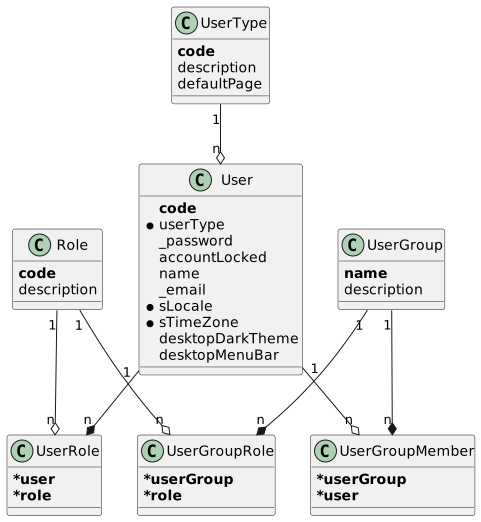
User Type (UserType)
A classification of users.
| Field | Description |
|---|---|
| Business key (up to 8 characters). |
| Human-readable name. |
| Optional default page (an |
User (User)
A user account.
| Field | Description |
|---|---|
| Business key — also the Spring Security username. |
| The user’s classification. |
| Optional encrypted password. Stored encoded by the framework’s |
| Whether sign-in is blocked. |
| Display name. |
| Optional email address. |
| Locale used to format dates/numbers/text for this user. |
| Time zone used to display timestamps for this user. |
| Preference flag: dark vs. light desktop theme. Default |
| Preference flag: show or hide the desktop menu bar. Default |
Role (Role)
A named permission grouping. Used by the acl submodule to grant object access; this submodule only stores the role identities.
| Field | Description |
|---|---|
| Business key (a |
| Human-readable name. |
User Group (UserGroup)
A group whose members all share its assigned roles.
| Field | Description |
|---|---|
| Business key (a |
| Human-readable description. |
User Role (UserRole)
Direct role assignment to an individual user.
| Field | Description |
|---|---|
| Owning user (composite business key with |
| The role assigned. |
User Group Role (UserGroupRole)
Role attached to a group. Every member of the group inherits the role.
| Field | Description |
|---|---|
| Owning group (composite business key with |
| The role attached to the group. |
User Group Member (UserGroupMember)
User membership in a group.
| Field | Description |
|---|---|
| Owning group (composite business key with |
| The member user. |
Functionality
Bootstrap of default user, group, and role
SYS_USR_BootstrapApi.bootstrap runs at system bootstrap and idempotently provisions a baseline set of records when they are missing: a default UserType (001), a default User (admin), a default UserGroup (001), a default Role (sys_ope), and the UserGroupMember and UserGroupRole rows that bind the admin user to the group and the role to the group. Existing records are never overwritten. The bootstrap pulls the default locale and time zone from sys.loc and fails fast if those are missing.
The defaults that govern this step are constants on SYS_USR_Constant:
| Constant | Value |
|---|---|
|
|
|
|
|
|
|
|
|
|
|
|
Logged-in user resolution
UserReaderService.getLoggedInUser reads the current username from the Spring Security context (VenloContext.getUserDetails()) and looks up the matching User row. It raises a business exception when the username does not resolve to a user — used by every action that needs to attribute work to "the current user" (audit fields, theme preferences, etc.).
Batch-job user sign-in
BatchUserReaderService provides the technical user the system runs as for background jobs that have no interactive session. loginBatchJobUser registers the configured batch-job credentials with VenloContext.setBackgroundUserDetails; getBatchJobUser returns the corresponding User entity. Credentials come from SystemSettingService, which reads the erp.sys.usr.batchJobUserName and erp.sys.usr.batchJobPassword properties and trims them.
UI preference toggles
UserPreferenceViewModel exposes two actions that flip the dark-theme preference on the currently logged-in user. Both actions are always enabled and persist immediately — the user does not need to save the preference page.
| Action | Effect |
|---|---|
| Sets |
| Sets |
Dynamic group-role and group-member matrices
Two view models render a dynamic checkbox matrix so administrators can manage role and group bindings without scrolling through long lists of link rows:
UserGroupViewModel_RolesBuilds one boolean field per
Roleon the user-group edit page. Loading a user group ticks the boxes that match itsUserGroupRolerows; saving the record removes every existing role binding for the group and re-creates them from the ticked boxes.UserViewModel_GroupMembersBuilds one boolean field per
UserGroupon the user edit page. Loading a user ticks the boxes that match itsUserGroupMemberrows; saving rewrites the user’s group memberships from the ticked boxes. Password edits go through Spring Security’sPasswordEncoderbefore being persisted.
Public API
SYS_USR_QueryApi
Read-side facade.
| Method | Description |
|---|---|
| Signs the runtime in as the batch-job technical user. |
| Returns the batch-job technical user. |
| Returns the user matching the current Spring Security session. |
| User by primary id. |
| User by code, or |
| Role by code, or |
| Direct role assignments for a user. |
| Members of a group. |
| Group memberships of a user. |
| Roles attached to a group. |
SYS_USR_CommandApi
Currently an empty placeholder — no cross-module write operations are exposed. User and group records are maintained through their default UI pages and the dynamic matrix view models.
SYS_USR_BootstrapApi
Single entry point bootstrap(HasTrace) — see Bootstrap of default user, group, and role above. Called by the system-wide bootstrap sequence, not by end users.
ViewModel actions
| Action | User-visible effect |
|---|---|
| Switches the desktop UI to the dark theme for the current user. |
| Switches the desktop UI to the light theme for the current user. |