
Workflow Tasks (TSK)
The tsk submodule of wfl is the heart of the workflow engine. It owns the task list (one per process instance), the tasks within it, and the three event streams — status, transfer, plan — that drive every state change. A task’s current assignment, status, priority, and due date are all derived from replaying the events on top of its initial state. The submodule also defines the cross-module extension interfaces (HasWorkflow, IsTaskRead, IsTaskWrite) that domain entities elsewhere implement to plug into the workflow framework. It depends on wfl.prc for the process and step definitions, on wfl.tms for teams, on sys.usr for users, on com.par for partners and contacts, on com.org for the department, on com.pop for mail attachments, and on acc.doc for the optional source document line.
Concepts
Task ListA process instance — one tree of tasks created from a
WFProcessfor a specific department, with an optional source document line and reference to a domain entity.TaskA single unit of work inside a task list. Created from a
WFProcessStep; carries the initial team assignment, user, status, priority, and due date as final fields, and the current values as derived business-information fields fed by the event streams.Task StatusWhere the task is in its lifecycle — Pending, Assigned, In Progress, Waiting, Exception, Canceled, Completed, or Locked.
Task FlowWhether the task is handled manually by a user (
M) or automatically by a batch job (A).Status Event/Transfer Event/Plan EventThree immutable timestamped event streams on a task: status changes, team/user re-assignments, and priority/due-date changes. Each event has a
Draft→Processedlifecycle.Task MailA linking row that attaches a
MailMessagefromcom.popto a task — the audit trail of mail traffic about a task.Task Assignment ModeA small enum (
DEFAULT/PROCESS_STEP_USER) that says whether a newly added task takes the assigned user from the caller or from the process step’s configured user.
Entities
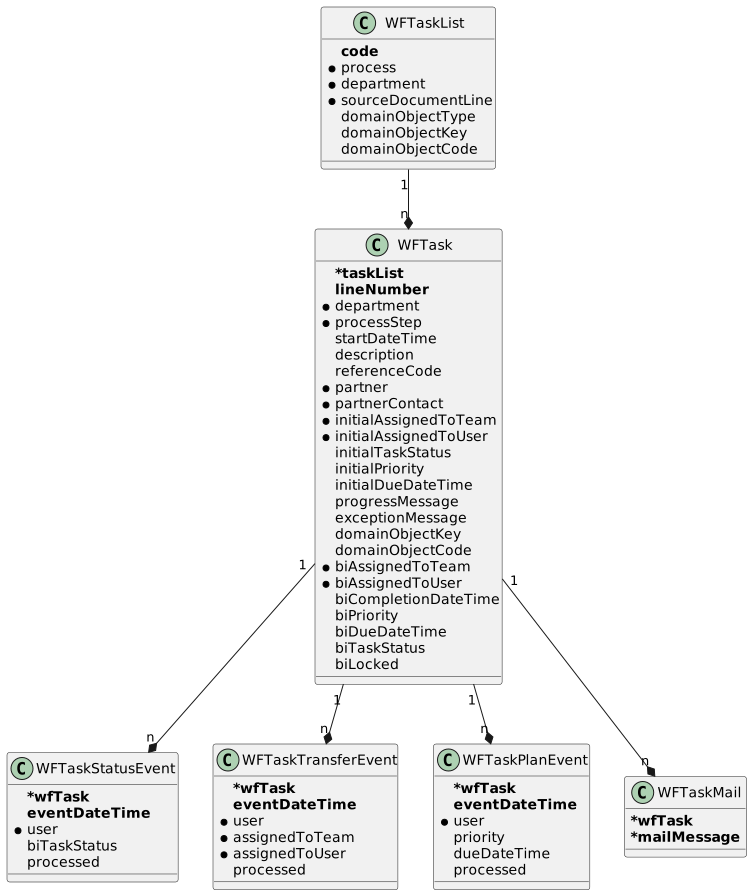
Task List (WFTaskList)
A process instance.
| Field | Description |
|---|---|
| Business key (a |
| The process the list runs (final). |
| Owning department (final). |
| Optional originating document line. |
| Optional domain-entity class name the list is about. |
| Optional domain-entity id. |
| Optional domain-entity business code. |
Task (WFTask)
One unit of work within a task list.
| Field | Description |
|---|---|
| Owning list (composite business key with |
| Position of the task within the list (final). |
| Owning department (final). |
| The process step this task realises (final). |
| When the task was created (final). |
| Optional free-form description (final). |
| Optional external reference (final). |
| Optional partner the task is about (final). Validated to belong to the same partner. |
| Team the task was initially assigned to (final). |
| Optional initial user (final). |
| Initial status (final). |
| Initial priority (final). |
| Initial due date/time (final). |
| Optional in-progress message a handler can write to. |
| Optional exception text when the task is in |
| Optional domain-entity reference (operational, internal). |
| Current team — derived from the latest processed transfer event. |
| Optional current user — derived from the latest processed transfer event. |
| Optional completion timestamp — set by the latest status event that puts the task into |
| Current priority — derived from the latest processed plan event. |
| Current due date/time — derived from the latest processed plan event. |
| Current status — derived from the latest processed status event. |
| Whether the task is locked (e.g. someone is editing). Default |
A validation rule enforces that the task’s department differs from the task list’s department (cross-department workflow).
Task Statuses (WFTaskStatus)
| Code | Name | Meaning |
|---|---|---|
| Pending | Created but not yet assigned to a user. |
| Assigned | Claimed by a user; not started. |
| In Progress | The user is actively working on the task. |
| Waiting | Paused waiting for input or a downstream event. |
| Exception | The task ran into an error and is awaiting attention. |
| Canceled | The task was cancelled. |
| Completed | The task was finished. |
| Locked | The task is temporarily locked. |
Task Flows (WFTaskFlow)
| Code | Name | Meaning |
|---|---|---|
| Manual | Handled by a user through a UI page. |
| Automatic | Handled by a batch job. |
Task Assignment Modes (WFTaskAssignment)
| Value | Meaning |
|---|---|
| Use the user passed in by the caller (or none) when adding the task. |
| Use the user configured on the process step ( |
Status Event (WFTaskStatusEvent)
An immutable record of a status change.
| Field | Description |
|---|---|
| Owning task (composite business key with |
| When the change happened (final). |
| The user who made the change (final). |
| The new status (final). |
| Lifecycle flag. |
Transfer Event (WFTaskTransferEvent)
An immutable record of a re-assignment.
| Field | Description |
|---|---|
| Owning task (composite business key with |
| When the transfer happened (final). |
| The user who made the change (final). |
| New team (final). |
| Optional new user (final). |
| Lifecycle flag. |
Plan Event (WFTaskPlanEvent)
An immutable record of a priority or due-date change.
| Field | Description |
|---|---|
| Owning task (composite business key with |
| When the change happened (final). |
| The user who made the change (final). |
| New priority (final). Default |
| New due date/time (final). |
| Lifecycle flag. |
Task Mail (WFTaskMail)
A link from a task to a mail message.
| Field | Description |
|---|---|
| Owning task (composite business key with |
| The mail message attached to the task. |
Functionality
Task-list creation
WFTaskWriterService.createTaskList creates a fresh WFTaskList for a process and department, then walks the process’s steps and instantiates a WFTask for every step flagged createAtProcessStart. Used by callers that own the upstream domain entity and want to spin up the workflow for it.
Task addition
addTask adds a single task to an existing list against a specific process step. It resolves the team and user from either the caller’s input or the process step’s defaults (driven by the WFTaskAssignment mode), captures the initial status/priority, and persists the task in Pending.
Status / transfer changes
WFTaskEventWriterService is the seam every status or transfer change goes through:
changeTaskStatusIfRequired(task, newStatus)Records a fresh
WFTaskStatusEventif the task’s current status differs fromnewStatus. Validates that the task is assigned to a user before moving to any "active" status. Returns the new event, ornullif no change was needed.transferTaskIfRequired(task, team, user?)Records a fresh
WFTaskTransferEventif the task’s current assignment differs from the supplied team/user. Returns the new event, ornullif no change was needed.
Both methods handle event creation only; processing the event (replaying it onto the task’s bi* fields) happens through the matching action writer.
Event replay
WFTaskEventReplayService is the engine that derives the task’s current state. It reads every processed event for a task in chronological order and applies it to the task’s bi* fields — biTaskStatus, biAssignedToTeam/biAssignedToUser, biPriority/biDueDateTime, biCompletionDateTime. Triggered when an event is confirmed (its processed flag flipped to true) by the matching action writer (WFTaskStatusEventActionWriter, WFTaskTransferEventActionWriter, WFTaskPlanEventActionWriter).
Event rendering
WFTaskEventRenderService produces a human-readable HTML rendering of a task’s full event history — the source for the Events UI button.
Task progress and exception
setTaskProgress(task, message) updates the task’s progressMessage (a free-form note the handler keeps current). setTaskError(task, exceptionMessage) writes the supplied text into exceptionMessage; clearWorkflowTaskError(task) empties it. Used by automatic handlers to surface their state in the UI.
Reference-entity link
setTaskReferenceEntity(task, entity) populates the task’s internal domainObjectKey/domainObjectCode from a DomainEntity so the UI can navigate from the task to the underlying domain row.
UI actions
The user-facing WFTaskViewModel exposes the task buttons that drive the manual flow. The Claim action assigns the current user to the task and moves it from Pending to Assigned; Unclaim releases the task back to the team. Transfer records a transfer event to the chosen transferToTeam. Open Page navigates to the page configured on the process step. Events renders the event history. The "My Tasks" filter on the form restricts the grid to tasks the current user is assigned to.
A separate developer view model (WFTaskDevViewModel) exposes a Change Status action that records an arbitrary new status — used to recover stuck tasks during development.
Public API
WFL_TSK_QueryApi
Read-side facade.
| Method | Description |
|---|---|
| The single task in a list for a given step code; raises if zero or more than one match. |
| Every task of a list. |
| Task by primary id. |
| Every pending task across the system, ordered by team and due date — feeds the workflow inbox view. |
WFL_TSK_CommandApi
Write-side facade. All methods delegate to WFTaskWriterService or WFTaskEventWriterService.
| Method | Description |
|---|---|
| Creates a fresh task list and instantiates the steps flagged |
| Adds a single task to an existing list under a specific process step. |
| Records a status event when the new status differs from the current. |
| Records a transfer event when the new assignment differs from the current. |
| Updates the task’s free-form progress message. |
| Sets the task’s exception message. |
| Clears the exception message. |
| Stores the task’s reference to a domain entity. |
| Convenience pass-through to the step lookup in |
| Disabled — always raises a business exception (workflow history must be preserved). |
Cross-module extension interfaces
HasWorkflowImplemented by domain entities (and their view models) that own a
WFTaskList. ExposesgetTaskList().IsTaskReadThe read-side seam for entities that wrap a
WFTask. Exposes the executed-by user, the start/completion timestamps, the task flow, and helpers (assertTaskIsNotCompleted,assertTaskUserIsValid,validateAfterTaskCompleted).IsTaskWriteThe write-side seam (
setExecutedByUser,setTaskCompleted,setTaskCanceled).
ViewModel actions
| Action | User-visible effect |
|---|---|
| Assigns the current user to the task and moves it to Assigned. |
| Releases the task back to its team. |
| Transfers the task to the team chosen on the form. |
| Navigates to the page configured on the task’s process step. |
| Renders the task’s full event history. |
| Processes a drafted event and replays it onto the task’s |
| Records an arbitrary new status — for development/recovery. |