
Server `DSL`
This document is part of the wercstat low-code framework (https://www.wercstat.com).
The following documents are available:
(1) Wercstat Overview: introduction to the framework
(2) Wercstat Getting Started: installation instructions and hello-world tutorial
(3) Wercstat Value Types: description of Java domain value types
(5) Wercstat Client DSL: description of the client-side Domain Specific Language
Base
theme-set
Theme-sets declare icons, colors, themes, theme-variants and styles.
Icon
Wercstat uses the default Vaadin Icon Set.
Icons are assigned to constants with a meaningful name within the domain.
The Vaadin COGS icon for example, can be declared as Wercstat-icon ICON_COMPILE.
theme-set SYS_Icons{
	icon ICON_COMPILE "COGS"
This makes ICON_COMPILE available in labels:
label compileActionLabel "Compile" icon ICON_COMPILEwhich renders as 
Color
Colors are declared as constants in order to enforce a consistent color schema within the application.
theme-set SYS_Icons{
	color COLOR_GREEN "green"
}
This makes the color available in labels:
label refreshSystemStatusLabel "Refresh" icon ICON_REFRESH icon-color COLOR_GREENwhich renders as 
CSS Class
CSS classes are declared as constants in order to enforce a consistent styling accross the application.
theme-set SYS_Layout{
	css-class CSS_WERCSTAT_RANGE_MINUS "real-range-minus"
	css-class CSS_WERCSTAT_RANGE_PLUS "real-range-plus"
	css-class CSS_WERCSTAT_FIELD_WARNING "real-field-warning"
}
This makes the styling available in forms:
label plannedDeliveryDate
row {
	value plannedDeliveryDate
	field prioritySignOffWPTasks
	value defaultDeliveryDateWarning read-only
	css-class CSS_WERCSTAT_FIELD_WARNING
}
which renders as 
Theme
Theme-classes are part of the selected Vaadin theme, by default Lumo.
In Wercstat they are primarily used for badge-components.
	theme BADGE "badge"
	theme BADGE_PRIMARY "badge primary"

	theme BADGE_SUCCESS "badge success"
	theme BADGE_SUCCESS_PRIMARY "badge success primary"

	theme BADGE_ERROR "badge error"
	theme BADGE_ERROR_PRIMARY "badge error primary"

	theme BADGE_CONTRAST "badge contrast"
	theme BADGE_CONTRAST_PRIMARY "badge contrast primary"
Badges are well suited as status indicators in grids:

or forms:

Theme-variant
Wercstat uses the default Vaadin Theme Variants.
These are variations within a theme that affect the visual presentation of components.
theme-set SYS_Icons{
	theme-variant BUTTON_SUCCESS_PRIMARY "success primary"
	theme-variant BUTTON_ERROR "error"
	theme-variant BUTTON_ERROR_PRIMARY "error primary"
}
Theme-variants can be used in labels:
label executeClaimTaskLabel "Claim" theme-variant BUTTON_SUCCESS_PRIMARY
label executeUnclaimTaskLabel "Unclaim" theme-variant BUTTON_ERROR
label executeTransferTaskLabel "Transfer" theme-variant BUTTON_ERROR_PRIMARY
these are respectively rendered as  ,
,  and
and  .
.
This makes buttons more recognizable, for example in the workflow task bar:

Style
Styles are converted to CSS class-names that can be assigned to web-components.
Currently only labels and buttons support the use of |
label-set
Labels enable the internationalization (i18n) of the user-interface.
All user-facing text is replaced by label-codes.
These codes are grouped together into label-sets,
and translated using standard Java i18n property-files.
Label declarations can contain the following key-words:
shortfor a short descriptioniconto reference an icon declared in atheme-seticon-colorto reference an icon declared in atheme-setthemeto reference an icon declared in atheme-settheme-variantto reference an icon declared in atheme-setstyleto reference an icon declared in atheme-set
For example, DSL declaration:
label-set TRD_Labels{

	label actionConfirmLabel "Confirm" icon ICON_CONFIRM theme-variant BUTTON_PRIMARY
	label actionUndoConfirmLabel "Undo Confirm" icon ICON_CONFIRM_UNDO theme-variant BUTTON_TERTIARY
}
The label set has an identifier (TRD_Labels), and every label has a code (actionConfirmLabel, etc.). Together
with the package name, these comprise the fully qualified name of the label.
The actionConfirmLabel, for example, is imported in the following action declaration:
import com.wercstat.erp.server.trd.TRD_Labels.actionConfirmLabel
import com.wercstat.erp.server.trd.TRD_Labels.actionUndoConfirmLabel

...

actions{

	action actionConfirm actionConfirmLabel order 100
	action actionUndoConfirm actionUndoConfirmLabel order 101
}
These buttons are part of order-confirmation:

The Undo button will only appear once the order has been confirmed, in stead of Confirm and Remove buttons.

All labels are imported into the application, and for convenience reasons, they are referenced only by label name. This means that label names should be globally unique in order to avoid conflicts.
server-configuration
Global application configurations are contained in one or more configuration DSL files.
They define the label-sets available in the application:
package com.wercstat.erp.system

import com.wercstat.erp.system.bc.SYS_BCLabels
import com.wercstat.erp.system.bf.SYS_BFLabels
import com.wercstat.erp.system.bt.SYS_BTLabels
import com.wercstat.erp.system.sr.SYS_SRLabels
import com.wercstat.erp.system.SystemLabels

server-configuration SystemSharedConfiguration{

	label-set SYS_BCLabels
	label-set SYS_BFLabels
	label-set SYS_BTLabels
	label-set SYS_SRLabels
	label-set SystemLabels
}Value Type
Overview
Value types are immutable objects that represent business concepts which are identified by its value.
Examples of Value Types are Amount, Price, Quantity and Confirmed.
Value types are identified by their content, an amount of 100 equals an amount of 4*25:
Amount a1 = new Amount(100);
Amount a2 = new Amount(4*25);

assertEquals(a1,a2);
This in contrast to entities which are considered equal if the entity-identifiers (primary-keys) match.
Value Types wrap Java primitive types in order to provide additional abstraction and validation.
The following value types are supported:
Boolean
Date
DateTime
Decimal
Enumerate
Integer
Long
String
Text
Time
Value Types make business code more readable and concise. Consider, for example, the following createOrder method:
public SalesOrder createOrder(
    Document document,
    OrderDate orderDate,
    Customer customer,
    Reference customerReference,
    Item item,
    Quantity quantity,
    Price price)
The input parameters are very concise. The caller has to provide a Document which
will be defined as a string, of a specific length and without spaces. The Reference is a
much longer string which does allow spaces. The OrderDate is defined to be different from
an InvoiceDate. The Quantity has a smaller scale than Price.
Compare this with the same method without value type abstraction:
public SalesOrder createOrder(
    String document,
    LocalDate orderDate,
    Customer customer,
    String customerReference,
    Item item,
    BigDecimal quantity,
    BigDecimal price)
Much of the semantics is lost. More over, this method allows the quantity and price to be mixed up. It accepts documents where a customer reference is expected, and there is no guarantee that the provided values do not exceed the field length of the database.
Only valid value-type instances can be created. Decimals are rounded upon creation to fit the precision and scale. String value types will throw an exception upon creation if they exceed the defined length. And, as value-types are classes, new validation logic can be added to the constructor.
Wercstat provides a convenient way to declare value types.
For example:
boolean Confirmed confirmedLabel (1)

date ExecutionDate executionDateLabel

datetime DataEntryDateTime dataEntryDateTimeLabel milliseconds

decimal Amount amountLabel 10 2 half_up

integer IPPort ipPortLabel 0 99999

long EventId eventIdLabel

string Description descriptionLabel 60

text Notes notesLabel

time BatchTime batchTimeLabel minutes| 1 | value-types have labels, which are used as defaults in entities and views. |
DSL Value Types are based on the Value Types described in the `Wercstat Domain` manual.
Because the DSL uses code-generation, it can add static methods which are not available through inheritance.
This section will only describe usage of the Value Type DSL and the additional static methods.
A more detailed explanation of value types can be found in the `Wercstat Domain` manual.
Value-type DSL declarations generate an abstract and a concrete class,
both in the generated source folder.
The abstract class extends a base value-type class (DomainBoolean, DomainString, etc.) and adds static constructors.
The concrete class is a skeleton that can be moved to the manual source folder and customized to add
validation or functionality.
For example:
boolean
Boolean value type DSL declaration:
import com.wercstat.frame.test.DefaultLabelSet.executionDateLabel

boolean Confirmed confirmedLabelThe abstract class extends DomainBoolean and adds static constructors and TRUE/FALSE constants:
final Confirmed c1 = Confirmed.of(true);
final Confirmed c2 = Confirmed.of(false);
final Confirmed c3 = Confirmed.of(c1);
final Confirmed c4 = c1.negate();

assertEquals(c1, Confirmed.TRUE);
assertEquals(c2, Confirmed.FALSE);
assertEquals(c3, Confirmed.TRUE);
assertEquals(c4, Confirmed.FALSE);

assertNotEquals(c1, c2);
assertEquals(c1, c3);
assertEquals(c2, c4);
For convenience there is an additional constructor that allows null values:
@Nullable final Confirmed c3 = Confirmed.ofNullable(null);
assertNull(c3);

@Nullable final Confirmed c4 = Confirmed.ofNullable(Boolean.TRUE);
assertEquals(Confirmed.TRUE, c4);
date
Date value type DSL declaration:
import com.wercstat.frame.test.DefaultLabelSet.executionDateLabel

date ExecutionDate executionDateLabelThe abstract class extends DomainDate and
adds static constructors:
final ExecutionDate d1 = ExecutionDate.now();
final ExecutionDate d2 = ExecutionDate.of(LocalDate.now());

final ExecutionDate d3 = ExecutionDate.of(2022,10,3);
final ExecutionDate d4 = ExecutionDate.of(d3.minusDays(1));

assertEquals(d1, d2);
assertNotEquals(d1, d3);
assertEquals(ExecutionDate.of(2022,10,2), d4);
and convenience methods:
@Nullable final ExecutionDate d1 = ExecutionDate.ofNullable((DomainDate)null);
assertNull(d1);

@Nullable final ExecutionDate d2 = ExecutionDate.ofNullable(LocalDate.now());
assertNotNull(d2);
datetime
DateTime value type DSL declaration, including precision:
import com.wercstat.frame.test.DefaultLabelSet.alertDateTimeLabel

datetime AlertDateTime alertDateTimeLabel milliseconds
The precision can be milliseconds, seconds or minutes. New instances will be truncated according to their precision.
The abstract class extends DomainDateTime and
adds static constructors:
final AlertDateTime d1 = AlertDateTime.now();
final AlertDateTime d2 = AlertDateTime.of(LocalDateTime.now());

final AlertDateTime d3 = AlertDateTime.of(2022,10,3,12,00);
final AlertDateTime d4 = AlertDateTime.of(d3.minusHours(1).minusMinutes(5));

assertNotEquals(d1, d2); // slight time difference
assertNotEquals(d2, d3);
assertEquals(AlertDateTime.of(2022,10,3,10,55), d4);
and convenience methods:
@Nullable final AlertDateTime d1 = AlertDateTime.ofNullable((DomainDateTime)null);
assertNull(d1);

@Nullable final AlertDateTime d2 = AlertDateTime.ofNullable(LocalDateTime.now());
assertNotNull(d2);
decimal
Decimal value type DSL declaration, including respectively, the precision, scale and
rounding:
import com.wercstat.erp.system.SystemLabels.amountLabel

decimal Amount amountLabel 10 2 half_up
The rounding can be ceiling, down, floor, half_down, half_even, half_up or up.
The abstract class extends DomainDecimal and
adds static constructors:
final Amount a1 = Amount.of(new BigDecimal("123.45"));
final Amount a2 = Amount.of(123.45);
final Amount a3 = Amount.of(0);
final Amount a4 = Amount.of(1.00);

assertEquals(a1, a2);
assertEquals(Amount.ZERO, a3);
assertEquals(Amount.ONE, a4);
and convenience methods:
@Nullable final Amount a1 = Amount.ofNullable(null);
assertNull(a1);

@Nullable final Amount a2 = Amount.ofNullable(BigDecimal.ONE);
assertNotNull(a2);
Note that the of static constructor can also be used for converting types:
Assuming Price is declared as follows:
decimal Price priceLabel 4 2 half_upthen convert an Amount to a Price is simple:
final Amount a1 = Amount.of(12.45);
final Price p1 = Price.of(a1);

assertEquals(a1, p1); (1)
assertEquals(a1.getValue(), p1.getValue());| 1 | Note that, even though the value types differ, they are considered equal based on value |
Conversion is only possible if the domains are compatible:
final Amount a1 = Amount.of(123.45);
assertThrows(DomainValueException.class, ()-> Price.of(a1)); (1)| 1 | Price only holds 4 significant digits |
enumerate
The DSL declaration for an Enumerate value type with three options; 'Yes', 'No', 'Unknown':
import com.wercstat.frame.test.DefaultLabelSet.*

enumerate YesNoUnknown yesNoUnknownLabel{
	Y: yesNoUnknownLabel_Y
	N: yesNoUnknownLabel_N
	U: yesNoUnknownLabel_U
}
The labels are defined as follows:
label yesNoUnknownLabel "Yes/No/Unknown"
label yesNoUnknownLabel_Y "Yes"
label yesNoUnknownLabel_N "No"
label yesNoUnknownLabel_U "Unknown"The enumerate implements DomainEnumerate and includes a static of constructor:
final YesNoUnknown a1 = YesNoUnknown.YES;
final YesNoUnknown a2 = YesNoUnknown.of("Y");
final YesNoUnknown a3 = YesNoUnknown.of("N");

assertEquals(a1, a2);
assertNotEquals(a1, a3);
empty or invalid enumerate-codes are not allowed:
assertThrows(DomainValueException.class, ()-> YesNoUnknown.of("P"));

assertThrows(DomainValueException.class, ()-> YesNoUnknown.of(""));
Note that the enumerate constants are the same as the label text. For
example YesNoUnknown.UNKNOWN. The UNKNOWN is derived from the yesNoUnknownLabel_U label.
The actual code stored in the database is U. Every enumerate item has
a getPersistentCode() method to retrieve the database value.
This approach ensures that enumerates in source-code are expressive, while the code in the database can remain short. However, this also means that changes in label-text will require changes in the source-code.
Enumerates have no |
integer
Integer value type DSL declaration, including the lower- and upper-bound for values:
import com.wercstat.frame.test.DefaultLabelSet.batchFrequencyLabel

integer BatchFrequency batchFrequencyLabel 0 60The abstract class extends DomainInteger and
adds static constructors and the constants ONE and ZERO:
final BatchFrequency n1 = BatchFrequency.ONE;
final BatchFrequency n2 = BatchFrequency.of(1);
final BatchFrequency n3 = BatchFrequency.of(n2);

assertEquals(n1, n2);
assertEquals(n1, n3);
with convenience methods:
@Nullable final BatchFrequency n1 = BatchFrequency.ofNullable(null);
assertNull(n1);

@Nullable final BatchFrequency n2 = BatchFrequency.ofNullable(1);
assertNotNull(n2);
The instantiated objects must conform to the integer value range of 0 to 60:
assertThrows(DomainValueException.class, ()-> BatchFrequency.of(-1));
assertThrows(DomainValueException.class, ()-> BatchFrequency.of(61));

assertNotNull(BatchFrequency.of(0));
assertNotNull(BatchFrequency.of(60));
Value type Long is not described here as it works similar as Integer,
be it without lower/upper bounds. |
string
String value type DSL declaration, including maximum number of characters:
import com.wercstat.frame.test.DefaultLabelSet.descriptionLabel

string Description descriptionLabel 60The abstract class extends DomainString and
adds static constructors:
final Description d1 = Description.of("abcdef");assuming there is a Name value type:
string Name nameLabel 10the static of constructor can be used for conversion:
final Name n1 = Name.of("abcdef");
final Description d1 = Description.of(n1);

assertEquals(n1, d1);
provided the value is not more than 10 characters for Name:
assertThrows(DomainValueException.class, ()-> Name.of("12345678901"));

assertNotNull(Name.of("1234567890"));
and the convenience methods:
@Nullable final Description s1 = Description.ofNullable(null);
assertNull(s1);

@Nullable final Description s2 = Description.ofNullable("test");
assertNotNull(s2);
Value type Text is not described here as it works the same as String,
except for the unconstrained text length. |
time
Time value type DSL declaration, including precision:
import com.wercstat.frame.test.DefaultLabelSet.batchTimeLabel

time BatchTime batchTimeLabel minutes
The precision can be milliseconds, seconds or minutes. New instances are truncated according to their precision.
The abstract class extends DomainTime and
adds static constructors:
final BatchTime d1 = BatchTime.now();
final BatchTime d2 = BatchTime.of(LocalTime.now());
final BatchTime d3 = BatchTime.of(d2.minusMinutes(1));

assertEquals(d1, d2);
assertNotEquals(d1, d3);
and convenience methods:
@Nullable final BatchTime d1 = BatchTime.ofNullable(null);
assertNull(d1);

@Nullable final BatchTime d2 = BatchTime.ofNullable(LocalTime.now());
assertNotNull(d2);
custom
Value Types can be extended with custom logic by adding the custom keyword to the declaration.
For example:
import com.wercstat.frame.test.DefaultLabelSet.documentCodeLabel

string DocumentCode documentCodeLabel 10 custom
The custom keyword will move the concrete subclass
from the generated-code folder to the manual-code folder.
package com.wercstat.frame.test.valuetype;

import com.wercstat.frame.test.valuetype.internal.AbstractDocumentCode;

public class DocumentCode extends AbstractDocumentCode{

	public DocumentCode(final String value) {
		super(value);
	}
}
Now new logic or validation can be added to the value type class.
Enumerates can be extended with custom code, however, as enumerates do not support
inheritance, any future changes in the |
Validation
New value type instances can be validate by overriding the entity constructor.
Value Types are instantiated when JPA entities are loaded.
This means also that custom logic is executed for all data retrieved from the database.
Any invalid values will cause an |
Example Document Codes
For example, ensure DocumentCode fields do not include spaces:
string DocumentCode documentCodeLabel 10 custompublic class DocumentCode extends AbstractDocumentCode{
public DocumentCode(final String value) {
super(value);
if(value.contains(" ")) {
throw BusinessException.create(
"Space not allowed in document code: %s",
value);
}
}
}Any document codes with a space will generate an exception:
final DocumentCode d1 = DocumentCode.of("ID1234");

assertNotNull(d1);
assertThrows(BusinessException.class, ()-> DocumentCode.of("ID 1234"));
Example Birth Dates
We want to ensure that birth-dates are between 1900 and the current date.
date BirthDate birthDateLabel custompublic class BirthDate extends AbstractBirthDate{
private static LocalDate minValue = LocalDate.of(1900, 1,1);
public BirthDate(final LocalDate value) {
super(value);
if(value.isBefore(minValue)) {
throw BusinessException.create("Birth-date before 1900 not allowed");
}
if(value.isAfter(LocalDate.now())) {
throw BusinessException.create("Birth-date after current date not allowed");
}
}
}Custom Logic
As with any class, value types can be extended by adding static and instance methods.
For example:
public String getPrefix() {
	return getLeft(2);
}
Usage:
final DocumentCode d1 = DocumentCode.of("ID1234");
assertEquals("ID", d1.getPrefix());
Entity
Overview
Domain Entities are mutable objects, typically persisted to a table in a database.
The Wercstat DSL provides an extended syntax to declare entities that
not only includes persistence but also other aspects of the application
like validation, nullability and consistency.
entity master User userLabel  (1) (2)
{
	business-key loginCode (3)

	/*
	 * Optional settings
	 */
	search-paths name, function (4)
	select-paths name, userType/code, userType/description, function (5)

	index nameIndex fields name (6)

	/*
	 * Fields
	 */
	user-fields{ (7)
		attribute LoginCode loginCode (8)
		attribute Name name

		attribute Notes notes optional (9)

		relation  UserType userType find-by (10)

		attribute BirthDate birthDate

		attribute YesNoUnknown remoteAccess default "U" (11)
	}

	operational-fields{
		attribute Age age optional calculated (12)

		attribute Name transientMandatoryName default "ABCD" transient (13)
		attribute Name transientOptionalName transient optional
	}
}| 1 | entities are typed to provide extra information, e.g. for archiving |
| 2 | label-code referring to an I18N table name |
| 3 | the natural key is loginCode. It must be unique for all users |
| 4 | the optional name and function search-fields allows full-text search on user-name when selecting users from a list |
| 5 | the optional `select-paths`are fields displayed by default on a entity-selection grid |
| 6 | the optional index adds an index to the database-table for increased performance |
| 7 | only user-fields can be updated via the user-interface |
| 8 | all fields are mandatory, unless they have an optional keyword |
| 9 | the userNotes text field can have value null if empty |
| 10 | find-by will create a repository method to find all users for a given user-type |
| 11 | the remoteAccess field is defaulted to Unknown. Note that the enumerate-code is used U, not the full name Unknown |
| 12 | the age is optional ('0' is allowed), it will be calculated based on year-of-birth |
| 13 | a mandatory transient field must have an initial default |
Most Domain Entities are implemented as |
Field Types
Fields are grouped into field-types:
final-fields: fields that are set on object construction and do not changeuser-fields: fields entered by the end-user in the UIoperational-fields: fields required for processingbi-fields: disposable fields, only needed to display business-information.
This makes it easier to validate, and reason about code.
For example:
final-fieldshave no setters, the fields can not be changed in code.user-fieldsmust be updated via a specialuser()entity-method. Using this method in code should be ared-flag, the code is changing data that was entered by an end-user.operational-fieldscan not be modified in the user-interface.bi-fieldsare not relevant for the running of the application, they only hold information that can easily be derived form other fields.
Entity Types <EXPERIMENTAL>
Entities are grouped into entity-types:
framework: System tablesconfiguration: Does not grow with new products, customers, suppliers, users or devicesreference-status: Reference to internal defined status, e.g. unit-statusreference-group: Reference to internal defined group, e.g. plan-groupreference-type: Reference to internal defined type, e.g. order-typereference-reason: Reference to internal defined reasonreference-external: Reference to external defined data, e.g. countrylookup: Never referenced, only used to find an entity. e.g. pricing tables with price per width, thickness, alloymaster: Grows with new products, customers, suppliers, users or devicesdocument:document-part:operational: Grows with new ordersoperational-plan:operational-task:operational-task-part:operational-event:calculated:temporary:
Code Generation
The User entity declared in the DSL will generate two classes; User and AbstractUser.
The abstract user class contains all field declarations, getters, setters and JPA annotations.
It will be regenerated when ever the User DSL changes and should not be modified manually.
The User class is only generated once and the location for all custom logic and validation.
The following User class is generated from the DSL declaration.
Notice there is a null-argument constructor, but only for the benefit of Hibernate/JPA.
It should not be used otherwise.
The business constructor contains the business-key and mandatory fields.
Notice that the table name is generated based on the package structure: bc_org_user.
This ensures that there always is an direct correlation between tabels and entities,
the same applies for the generated Java classes.
The business-key is translated into a uniqueness constraint uniqueConstraints=@UniqueConstraint(columnNames={"loginCode"})).
The primary key is always a surrogate key with name id, either a Long or UUID (Universal Unique ID).
System Fields
Entities have the following persistent system fields by default:
| Field | Origin | Description |
|---|---|---|
| JPA | optimistic locking version |
| Spring Data | date/time entity was created |
| Spring Security | login name of user who created the entity |
| Spring Data | date/time entity was modified last |
| Spring Security | login name of user who modified the entity last |
|
| boolean to indicate if the entity should, by default, be filtered in the UI |
|
|
|
System Methods
Entities have the following system methods (the name in brackets is the class that implements the methods):
DomainEntity)BusinessKey getBusinessKey() (1)
EntityKey getEntityKey() (2)
boolean isReadOnly(final String fieldName) (3)
boolean isMandatory(final String fieldName) (4)
boolean equals(@Nullable final Object otherObject) (5)
void validate() (6)| 1 | serializable representation of the entity business key |
| 2 | surrogate-key wrapper class |
| 3 | if true, the field setter will generate an exception |
| 4 | if true the field setter will not accept a null or empty value. |
| 5 | equals based on entity-keys |
| 6 | overridable method, called before the entity is persisted |
AbstractEntity)<?> update() (1)
<?> operational() (2)| 1 | access all user-field setters |
| 2 | access all operational-field setters |
PersistentDomainEntity)EntityVersion getEntityVersion()(1)
void setArchived(Archived archived) (2)
Archived getArchived()
boolean isArchived()
DataAreaId getDataAreaId() (3)
void setDataAreaId(DataAreaId dataArea)| 1 | optimistic-locking version number |
| 2 | archived persistent toggle |
| 3 | multi-tenancy data area |
HasExternalValidation)void setValidationRequired(boolean validationRequired)
boolean isValidationRequired()
void setValidationPending(boolean validationPending)
boolean isValidationPending();For internal use |
AbstractPersistentEntity)LocalDateTime getCreatedDate()
String getCreatedBy()
LocalDateTime getLastModifiedDate()
String getLastModifiedBy()System Events
Events are implemented as template methods that can be over-written (@Overwrite).
AbstractPersistentEntity)void onPreRemove()
void onPrePersist()
void onPreUpdate()Read-only
Entities have getter and setter methods for all fields.
Fields can be made readOnly by implementing the entity boolean isReadOnly(String pathName) method. This method is called in every setter method, before updating the value. And if the method returns true an exception is thrown.
This affects not only the User Interface, but also for internal Java business logic.
For example:
class SalesOrder{

    ...

    public boolean isReadOnly(String pathName){

        if(pathName.equals(SalesOrder.CONFIRMED)){
            // Confirm / unconfirm sales order always allowed
            return false;
        }

        if(isConfirmed()){
            // If the sales order is confirmed, all fields are readOnly
            return true;
        }

        return super.isReadOnly();
    }

    ...
}
The super.isReadOnly() will return false for entity fields, and true for values from related entities (e.g. salesOrder.customer.name).
Even calculated fields have 'internal' setters, prefixed with a double underscore. |
Extensions
Entities support the following extensions:
custom-entity: to extend functionality of the entity itself.custom-update: to extend entity persistence eventssave,delete,validate.custom-reader: to extend repository methods and queriescustom-writer: to extend repository methods and queries
These extensions can be selectively added to the entity DSL declaration:
entity User userLabel
	custom-entity
	custom-update
	custom-writer
	custom-reader
{
...
}
Nullability
Wercstat ensures that only valid entities can be created:
all business-key fields are part of the constructor
all mandatory fields without default values are part of the constructor
setters of mandatory fields do not allow null-values
Constructor parameters and all entity 'getters' and 'setters' are annotated with either @Nullable or @NonNull.
The concrete User class has the following constructor:
	public User(
		@NonNull final LoginCode loginCode,
		@NonNull final Name name,
		@NonNull final UserType userType,
		final BirthDate birthDate
		){

		super(loginCode, name, userType, birthDate);
	}
}
It includes all mandatory fields which have no default value. The benefit of this approach is compile-time validation, for example:
UserType userType = user.getUserType();
userType.getDescription();
There is no need to check if userType is null, before calling a method on the
object. The compiler knows that getUserType() can not return a null value.
The following code however can generate a runtime time error:
UserNotes userNotes = user.getUserNotes();
userNotes.getLength(); // Possible null-pointer exception
by using nullability annotations, the error will be flagged during development.
|
Entity Validation
Wercstat will validate the entity in the constructor,
so that for all instantiated entities, it is guaranteed that mandatory
fields have a value and can not be null.
This is supported by @Nullable annotations allow the IDE to perform
nullability checks during development.
Every entity has a validate() method which is called before persisting or
updating an entity (using JPA @PrePersist and @PreUpdate).
By default it checks that mandatory String, Integer or Long fields have a non-empty value
(empty string or '0').
The validate method can be overridden in the concrete class.
When doing so, always call the super() method to execute field validations.
It is not advised to access the entity-manager in the |
business-key
Entities have both a surrogate key and a business key.
The surrogate key is a technical key, invisible to the end-user and immutable.
In Wercstat it is implemented as a number or GUI which uniquely identifies every record in the entity table.
The surrogate key is required to implement foreign keys, i.e. relations to other tables.
The business key is visible to the end-user. It consists of one or more fields that
uniquely identity an entity. For example TermsOfDeliveryCode or SalesOrderNumber.
Business keys are allowed to change, but that should only be done with care, as
they are communicated-to and used-by the outside world.
The business-key must be declared at the start of the entity-declaration.
entity master User userLabel{

	business-key loginCode (1)

	user-fields{
		attribute LoginCode loginCode
	}
}| 1 | field loginCode must be unique for all users |
|
search-paths
search-paths is an optional list of field-paths,
which are searched when entering a search-term to find a single entity.
Any time there is an input-form with a relation field, we can enter either the business-key, or a search term.
Wercstat will first check if the input-value is a
business-key, if so the entity is selected.
If the input is not a business-key, Wercstat will
try a substring search (like in SQL) on all
search-fields as defined in the entity.
Should one entity be found, it is automatically selected. Otherwise a selection-list is shown with all the entities that fit the search-term.
A Partner is defined as follows:
entity master Partner partnerLabel
{
	business-key code (1)
	search-paths name, country/description (2)
	select-paths code, name, country/code, country/description (3)

	user-fields {
		attribute PartnerCode code
		attribute Name name
		relation Country country
	}
	...
}| 1 | when finding a Partner there is a search on business-key code ,
and additional fields name and country-description |
| 2 | if more than one result is found in the search, these fields will be displayed in the selection form |
The sales order form has a field to select a Partner:
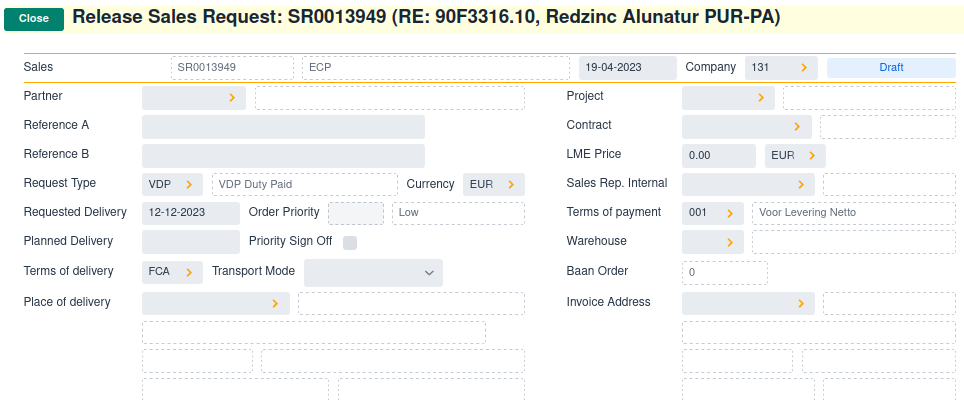
Select partner by business-key
The user can enter the partner-code to select a partner:

Select partner by name
The user can also enter a search-name in the selection field:

if only one partner has abc in its name, then the partner will be selected.
If there are multiple partners, the user has to select the partner:
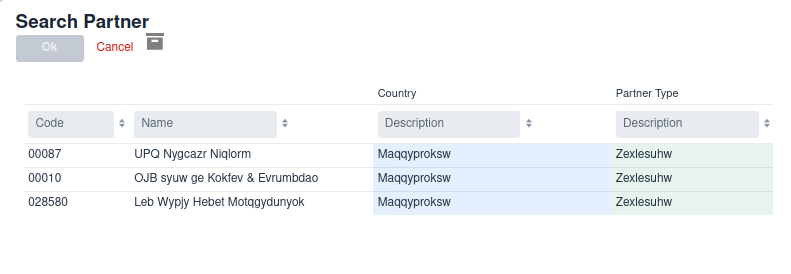
Select partner by country
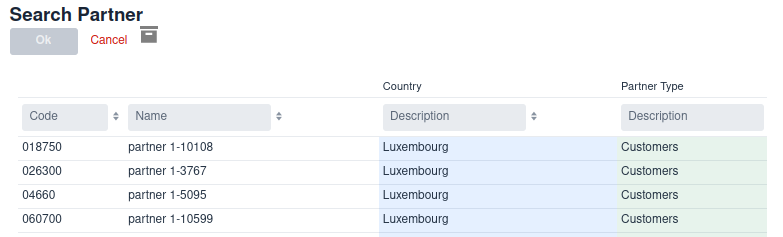
Because country/description is part of the search-fields,
the users can also enter (part-of) a country name in the selection field:

giving a list with customers residing in the country:
It is possible to add additional filters in the |
select-paths
select-paths is a optional list of grid- field-paths which are displayed when
selecting an entity from a list.
index
Wercstat creates a table index for the business-key,
and for all foreign relation fields.
entity SalesOrder
{
	business-key documentCode

	user-fields{
		attribute DocumentCode documentCode

		relation Customer customer

		attribute Reference reference
	}
}
This will create a SalesOrder table with an uniqueness-constraint on column documentCode,
and an index on column customer.
The entity is often searched by customer reference, so an extra findByAllByReference
method is declared in the Sales Order Repository.
@Repository
public interface SalesOrderRepository extends DomainJpaRepository<SalesOrder>{

	List<SalesOrder> findByDocumentCode(DocumentCode documentCode);

	List<SalesOrder> findByAllByReference(Reference reference);
}
However, this might cause a performance problem as there is no table index on the
reference field. The database will scan all records to find a specific reference.
This can be solved by defining an additional index on the entity:
entity SalesOrder
{
	business-key documentCode

	index referenceIndex fields reference (1)

	...
}| 1 | multiple fields are allowed |
This will create an extra JPA Index annotation on the Java entity class,
which in turn adds the index to the database.
The index must be defined on the concrete entity-class. If this class has custom logic it will not update automatically when the index changes. In that case, copy the JPA TABLE annotation from the abstract class (which has been updated) back to the custom concrete class. |
final-fields
Entity fields are grouped in to sets.
The final-field set contains fields that only get a value once, and can not be changed.
And of course the field has only getters, no setters.
The value must be provided when an object is instantiated, either by:
providing a default value
defining the field as `calculated
adding it to the constructor
Wercstat will ensure that final-fields are added to the entity constructor if required.
entity operational resource Bundle bundleLabel
{
	business-key code
	search-paths code

	final-fields {
		relation Company company (1)
}| 1 | company must be provided in the construct and is not allowed to change |
JPA / Hibernate entities require a no-argument constructor.
Non-argument constructors are incompatible with |
user-fields
User fields can be updated both in the user-interface and in code.
In order to make it clear to the programmer that the field is
intended for an end-user, the setters must be accessed via a user() method.
entity document SalesOrder salesOrderLabel{

	business-key documentCode

	user-fields{ (1)
		attribute DocumentCode documentCode
		relation Company company
		relation Customer customer
	}
	...
}| 1 | user fields |
Updating the fields:
SalesOrder salesOrder = new SalesOrder();

salesOrder.user() (1)
	.setDocumentCode(documentCode)
	.setCompany(company) (2)
.setCustomer(customer);| 1 | first call user() to update user-fields |
| 2 | notice that setters can be chained |
operational-fields
Operational fields can only be updated in code, not via the user-interface.
The setters must be accessed via an update() method.
entity configuration NumberSeries numberSeriesLabel
{

	business-key code

	user-fields {
		attribute NumberSeriesCode code
		...
	}

	operational-fields { (1)
		attribute FirstFreeNumber firstFreeNumber default 1
	}
}| 1 | operational-fields |
access in code:
final FirstFreeNumber newNumber = numberSeries.getFirstFreeNumber().add(FirstFreeNumber.ONE);
numberSeries.update().setFirstFreeNumber(newNumber); (1)| 1 | first call update() to update operational fields |
bi-fields
transient
transient entities are not persisted, i.e. not stored in the database.
No repository reader or writer classes are generated.
custom-entity
Adding the custom-entity keyword to an entity declaration moves the concrete entity class
to the manual source folder.
entity User userLabel
	custom-entity (1)
{
...
}| 1 | move entity from generated source folder to manual source folder |
The concrete Java class has the following structure:
@Access(AccessType.FIELD) (1)
@Entity
@Table(name=User.TABLE_NAME (2)
,uniqueConstraints=@UniqueConstraint(columnNames={"loginCode"})
,indexes = {@Index(name="referenceIndex", columnList="name")})

public class User extends AbstractUser{

	// Protected constructor required by Hibernate
	protected User(){
		super();
	}

	public User(
			final LoginCode loginCode,
			final Name name,
			final UserType userType
		){

		super(loginCode, name, userType); (3)
	}
}| 1 | annotations that can not be moved to the abstract User class |
| 2 | the table name is a constant on the abstract User class |
| 3 | always call the constructor of the abstract class in order to validate the arguments |
The concrete User can now be extended by overriding constructors, getters, setters and adding new methods.
Hibernate requires a non-argument constructor in order to instantiate objects from the database. There should be no logic in this constructor |
custom-writer
With a custom-writer new business logic can be triggered when
entities are persisted or deleted.
Adding the custom-writer keyword to an entity declaration moves the
concrete entity-writer class to the manual source folder.
entity User userLabel
	custom-writer (1)
{
...
}| 1 | move the entity-writer from generated source folder to manual source folder |
The following methods can be implemented:
void beforePersistRecord(final T entity)
void afterPersistRecord(final T entity)

void beforeRemoveRecord(final T entity)
void afterRemoveRecord(final T entity)
custom-reader
With a custom-reader new queries can be added to the Spring data repository.
Adding the custom-reader keyword to an entity declaration moves the
Spring Data repository interface to the manual source folder.
entity User userLabel
	custom-reader (1)
{
...
}| 1 | move the entity-reader from generated source folder to manual source folder |
The repository has default finders for the business-key
and optional find-by fields.
@Repository
public interface UserRepository extends DomainJpaRepository<User>, UserRepositoryExtension{
	// generated-start
	@Nullable User findByLoginCode( LoginCode loginCode);
	// generated-end
}
Java classes in the manual source folder can not be updated by the framework. So once the repository has moved, any additional or changed find methods will not be visible. |
relation-validation
relation-validation enforces field-validation spanning multiple entities.
If two entities are related, and both have a field of the same entity type, then it must be specified whether both fields have the same value.
For example the Company entity.
It might be used in entities SalesOrder, Customer and SalesContract.
relation-validation enforces validation of the company relation between these entities.
If two entities are related, and both have a field of type Company,
then it must be specified whether both fields have the same value.
If a Customer is assigned to a SalesOrder, then they must both belong to the same company.
The same applies to the SalesOrder and the SalesContract.
Given the following entities:
entity master Company companyLabel
relation-validation (1)
{
	...
}

entity document SalesContract salesContractLabel{
	business-key contractCode

	user-fields{
		attribute ContractCode contractCode
		relation Company company (2)
		relation Customer customer
	}
	...
}

entity document SalesOrder salesOrderLabel{

	business-key documentCode

	user-fields{
		attribute DocumentCode documentCode
		relation Company company (3)
		relation SalesContract salesContract (4)
		relation Customer customer
	}
	...
}| 1 | relations between entities with a company relation must be checked |
| 2 | sales contract has a company field |
| 3 | sales order has a company field |
| 4 | sales order has a relation with SalesContract |
Because SalesOrder has both a company field, and a relation with
a table that also has a company field (SalesContract),
the entity-validate becomes mandatory.
entity document SalesOrder salesOrderLabel{

	...

	entity-validate{

		relation contract/company equals company (1)
		relation contract/partner equals partner (2)
	}
}| 1 | ensure that the contract belongs to the same company as the sales-order |
| 2 | ensure that the customer of the contract is the same as the customer of the sales-order |
These restrictions can be added for all entities,
their use is not restricted to entities with the |
Validation can also be done between two foreign-relations. For example |
entity-status
The entity-status keyword provides default logic and validation
for common status fields, like confirmed, released, blocked, canceled, completed, processed and retired.
The finance-release-task entity is defined as follows:
entity operational-task WPFinanceReleaseTask wpFinanceReleaseTaskLabel
{
	business-key wpDocument, lineNumber

	operational-fields{

		...

		attribute Canceled canceled default false calculated (1)
		attribute Completed completed default false calculated (2)

		attribute ExecutionDateTime completionDateTime completionDateTimeLabel optional calculated (3)
	}

	bi-fields{
		attribute TaskStatus biTaskStatus default "P" calculated (4)
	}

	entity-status biTaskStatus { (5)
	 	status-canceled canceled
	 	status-completed completed timestamp completionDateTime
	}
}| 1 | boolean field that is true if the task is canceled |
| 2 | boolean field that is true if the task is completed |
| 3 | date/time when the completed field was set to true. |
| 4 | task status, which is an enumerate field, calculated based on canceled and completed.
This field is displayed on tasks-lists in the UI. |
| 5 | declare which boolean fields are related to a status, in this case status-canceled and status-completed |
By providing this additional information, Wercstat can provide additional logic:
it is not possible to cancel the task once it has been completed
it is not possible to complete the task once it has been canceled (first undo-cancelation)
it is not possible to delete the task once confirmed or canceled
the field
completionDateTimeis automatically updated whencompletedis set totruebiTaskStatuswill be recalculated ifcompletedorcanceledchangesboth
cancelandcompletedbuttons will
implements-read
Interface declarations and implementation can be defined in the Wercstat DSL.
The actual implementations and interface definition must be done in the generated Java classes.
for example:
interface IsTask domain-entitythis will generate a default interface Java class in the main source tree.
entity WPCapacityTask wpProcessTaskLabel
	implements-read IsTask<WFTask> (1)
{
...
}| 1 | the generated Java entity will implement interface IsTask |
implements-write
table-name
Keyword table-name specifies the name of the table in the database, if it differs from the name in the entity.
This is required if the table-name corresponds with a reserved keyword in the database.
Of course it is always better to avoid reserved keywords as table-names.
entity SalesOrder salesOrderLabel table-name "sales_order"The entity is named SalesOrder, but the table-field has name sales_order.
Fields
Overview
Entities have one or more fields, which can be attributes or a relations.
For example:
attribute Name userName (1)
relation UserType userType (2)| 1 | String field of type Name with a fixed length. |
| 2 | A foreign-key to entity UserType |
All fields support keywords optional, calculate, transient, find-by and column-name.
attribute
Attributes represent value-types like Name, Amount.
Attributes have a value-type, a name, an optional label,
and optional properties like optional, calculated or transient.
entity User userLabel
{
	...
	attribute Name name
	attribute Notes notes optional
	...
}
the Name (with capital N) refers to the value-type Name,
and the name is the actual field name.
All attributes are mandatory by default, this means:
string: not emptynumeric value: not zerodate,timeortext: notnull.
Enumerates and booleans are always mandatory.
The name in the example above is mandatory.
A null or empty value when creating the entity will result in an exception.
relation
Relations declare foreign keys to other entities.
Relations have a name, an optional label,
and optional properties like optional, calculated or transient.
entity User userLabel
{
	...
	relation UserType userType
	...
}
As with attributes, all relations are mandatory by default, which means not-null.
optional
Both attributes and relations can be defined as optional, for example:
relation Brand itemBrand optional
attribute ItemCodePartner oemCode oemCodeLabel optional
Fields with keyword optional can be empty,
meaning value null, 0 or "" depending on the field-type.
Note that Enumerates and Booleans must always have a value.
All fields that do not have the optional keyword are considered mandatory.
As a rule entities can only be instantiated if all mandatory fields are not empty.
What is considered an empty value depends on the field type:
| Field Type | Empty value | Remark |
|---|---|---|
| Booleans are always mandatory | |
|
| |
|
| |
| 0 | |
| Use extra option ,e.g. | |
| 0 | |
| 0 | |
|
| |
|
| |
|
| |
|
|
Mandatory fields are checked both in the entity constructor and in the field setters. An exception will be thrown when assigning an empty value to a mandatory field.
The entity constructor consists of the business-key, plus all the fields required to make sure mandatory fields have non-empty values.
In practice this means the constructor includes all mandatory fields except when they are defined as calculated, transient or have a default value.
Non-nullable fields A string field can not be Numeric fields (decimal, long, integer, short) can not be
Nullable fields All fields that can have a This will ensure that, if the field is mandatory,
no |
Domain entities implement method isMandataory(String fieldPath) which can be extended to make fields optional or mandatory at run-time.
Note, it is not possible to make fields optional which are mandatory in the entity declaration.
For example
name field is mandatoryassertThrows(MandatoryFieldException.class,()->user.setName(null));
assertThrows(MandatoryFieldException.class,()->user.setName(Name.of("")));
assertDoesNotThrow(()->user.setName(Name.of("Jack")));userType relation is mandatoryassertThrows(MandatoryFieldException.class,()->user.setUserType(null));birthDate field is mandatory and can not be before 1900 or in the futureassertThrows(MandatoryFieldException.class,()->user.setBirthDate(null));
assertThrows(BusinessException.class,()->user.setBirthDate(BirthDate.now().plusDays(1)));
assertThrows(BusinessException.class,()->user.setBirthDate(BirthDate.of(1800,1,1)));
assertDoesNotThrow(()->user.setBirthDate(BirthDate.of(2001,1,1)));notes field is by default null and accepts empty valuesassertEquals(null,user.getNotes());
assertDoesNotThrow(()->user.setNotes(null));
assertDoesNotThrow(()->user.setNotes(Notes.of("")));remoteAccess field is default set to Unknown and mandatoryassertEquals(YesNoUnknown.UNKNOWN,user.getRemoteAccess());
assertThrows(MandatoryFieldException.class,()->user.setRemoteAccess(null));transientOptionalName field is optionalassertEquals(Name.of(""),user.getTransientOptionalName());
assertEquals(Name.EMPTY,user.getTransientOptionalName());
assertThrows(MandatoryFieldException.class,()->user.setTransientOptionalName(null));
assertDoesNotThrow(()->user.setTransientOptionalName(Name.of("")));transientMandatoryName field has a default value and is mandatoryassertEquals(Name.of("ABCD"),user.getTransientMandatoryName());
assertThrows(MandatoryFieldException.class,()->user.setTransientMandatoryName(null));
assertThrows(MandatoryFieldException.class,()->user.setTransientMandatoryName(Name.of("")));
assertDoesNotThrow(()->user.setTransientMandatoryName(Name.of("EFGH")));Text and String fields
The main distinction between String and Text fields is nullability.
Text fields can be null in code and in the database,
String-fields always have a value and are never null, not in the database, not in code.
This distinction makes it easier to recognize Text fields in code;
if the Java-String is nullable, it is a Text in the database and can hold multiple lines.
calculated
calculated fields are updated by logic of the entity itself.
Calculated fields have a protected setter (with a double underscore prefix '__' )
to indicate that they are not part of the public API of the domain entity.
Calculated field setters are defined as 'protected' and can only be accessed from within the package of the entity class.
Consider a User entity with calculated fields notesLastUpdate, and Age.
entity master User userLabel custom-entity{

	business-key loginCode

	user-fields{
		attribute LoginCode loginCode

		attribute LogDate notesLastUpdate calculated optional

		attribute BirthDate birthDate
	}

	operational-fields{
		attribute Age age optional calculated transient
	}
}
Wercstat will generate default getter-methods for calculated fields.
In order to implement these the User entity must be marked with keyword custom-entity.
This will move the User.java class from the generated to the main source folder.
notesLastUpdateThe notesLastUpdate field is store in the database,
so we only have to make sure it is updated when the notes field changes.
@Override
public void setNotes(@Nullable final Notes notes) {
	super.setNotes(notes);

	__setNotesLastUpdate(LogDate.now()); (1)
}| 1 | The __ setter prefix indicates that this method should only be called from within the class itself,
or from within the package as it has access protected. |
AgeThe Age field can not be stored as it changes continuously.
In this case we simple calculate the value on every getter request.
@Override
public Age getAge() {
	return Age.of(getBirthDate().yearsBetween(BirthDate.now()));
}
For example
notesLastUpdate field is set after calling setNotes(…)assertNull(user.getNotesLastUpdate());
user.setNotes(Notes.of("ABC"));
assertNotNull(user.getNotesLastUpdate());age field is calculated based on the current yearuser.setBirthDate(BirthDate.of(2000,1,1));
assertEquals(2022, LocalDate.now().getYear());
assertEquals(Age.of(22), user.getAge());Calculated fields are not available in entity-builders (special classes for importing data). |
transient
transient fields are not persisted, i.e. not stored in the database.
This also means they must be optional unless they have a default value.
Otherwise it would not be possible to load a valid entity from the database.
Entities themselves also have a transient option. This will remove all server side persistence-related code. |
find-by
The find-by keyword will create a method in the repository reader to
retrieve all instances of the entity, given a value of the field.
relation UserType userType find-by (10)column-name
Keyword column-name specifies the name of the field in the database, if it differs from the name in the entity.
This is required if the field-name corresponds with a reserved keyword in the database.
Of course it is always better to avoid reserved keywords as field-names.
attribute Description description column-name "desc"The entity-field is description, but the table-field has name desc.
default
The default keyword only applies to attribute fields.
It sets the initial attribute value during object construction.
For example:
attribute Confirmed confirmed confirmedLabel default false
attribute YesNoUnknown remoteAccess default "U"
attribute WPProcessStepSequence wpProcessStepSequence default "M"
Default attribute values are mainly used to provide initial values to enumerate fields.
one
The one keyword only applies to relation fields.
It defines a one-to-one relation between entities.
The Company is defined in the common module and holds a range of company defaults.
With the introduction of a production module, more company-related defaults are required.
However, to keep the module hierarchy intact, the Company entity must not reference
entities in the production module.
For this reason a ProductionCompany entity is introduced. It holds all defaults related to the trade module.
As there can only be one ProductionCompany for every Company, and visa versa, the appropriate relation is one-to-one.
entity configuration ProductionCompany productionCompanyLabel
{
	business-key company

	user-fields {
		relation Company one company (1)
		relation ProductionServiceLevel productionServiceLevel
	...
	}
}| 1 | the one keyword indicates the one-to-one relationship with Company |
The ProductionCompany entity has no surrogate key of its own.
It is identified by the Company,
so the surrogate primary key of the ProductionCompany entity is company in stead of the normal id field.
Assume the Company entity has the following fields:
| field-name | |
|---|---|
id | primary (surrogate) key |
companyCode | The business key |
description |
then the ProductionCompany will have fields:
| field-name | |
|---|---|
company | primary key and foreign-key to field |
productionServiceLevel |
ViewModel
Overview
The ViewModel is a server-side representation of a user-interface form.
Any changes to the view-model will be reflected in the UI,
and any changes in the UI (e.g. user presses a button or enters a text-field)
will be propagated to the view-model.
This allows the developer to add UI business-logic on the server side (in Java),
with full transaction management and dependency injection.
Examples of view-model business logic:
a user enters a customer in the sales-order form, and the default terms-of-delivery for that customer are added to the sales order.
a user changes the
terms-of-deliveryof a sales order to 'Ex-works', and the delivery address automatically changes to the company-address.a user confirms the status of a sales order, all UI components become read-only and the
confirmbutton disappears.
By extending the view-model it is possible to:
change the content and status (mandatory, read-only, visible) of UI components like labels, input-fields and buttons
react to events like value-change, button-press or window close
display notifications and HTML message boxes
change selection lists, open new client-side pages
etc.
Server-side exceptions are displayed to the user and logged in the cloud for help-desk support. When an exception occurs the current database transaction is aborted.
Mandatory
mandatory view-model fields have a visual prompt, on the User Interface, to show that a value must be entered.
The fact that a field is mandatory is primarily defined in the Entity, but can be overridden in the view-model.
No entities can be instantiated or updated when mandatory fields are null or empty.
This will be checked in the Entity constructor and all setter methods.
In the view-model however, all fields are optional, as the view-model represents an entity being modified by the user.
This becomes apparent in the signatures of the setters and getters, for example the mandatory 'userType' relation field:
User entity | User view-model |
|---|---|
|
|
|
|
It is possible to override the mandatory field setting for the view-model during editing by implementing the isMandatory(<fieldName>) method of the view-model.
This can be useful, for example, when fields are conditionally mandatory depending on the values of other fields.
System Methods
View models have the following system methods (the name in brackets is the class that implements the methods):
HasRequestContext)RequestContext getRequestContext()SharedViewModel)String getViewModelName()
short getDataAreaId()HasAuthorizations)AclAuthorization getAclAuthorization()
void setAclAuthorization(final AclAuthorization aclAuthorizationDto)HasPersistence)void refreshRecord()
void loadRecord(@Nullable final EntityKey entityKey)HasIdentity)boolean isRecordSelected()
String getEntityName()
@Nullable ClientKey getClientKey()HasBaseFilter)void setBaseFilter(final NamedQueryFilter filter)
NamedQueryFilter getBaseFilter()
void setBaseOrder(@Nullable final QueryOrder order)
@Nullable QueryOrder getBaseOrder()HasArchivedFilter)boolean isArchivedFilter()
void setArchivedFilter(final Archived archivedFilter)HasRecords)default long getEntityCount(final GetEntityCountRequest request)
default @Nullable EntityRecord getEntityRecord(final GetEntityRecordRequest request)
List<EntityRecord> getEntityRecordList(final GetEntityRecordListRequest request)HasFindByBusinessKey)E findByBusinessKey(@Nullable final BusinessKey businessKey)
E findByBusinessKeyValues(@Nullable final Object... keys)HasDirty)boolean isDirty()
void setDirty(final boolean dirty)HasMutableFields)void setFieldValue(final String fieldName, @Nullable final Object primitiveValue)HasFields)void clearFields()HasJpaReadPersistence)default void setToDefaultAllFields()
void setToDefaultEntityFields()
void setToDefaultFormFields()
boolean isPersistentRecord()HasCrud)void createRecord()
void copyRecord()
void removeRecord()
void saveRecord()ServerViewModelCrud)void executeWithEntity(final Consumer<E> consumer)
E getViewModelEntity()HasZoomDetail)void executeFieldZoomDetail(
final String zoomFieldName,
@Nullable final String zoomViewName) {HasZoomSelect)void executeFieldZoomSelect(
final ZoomSelectRequest zoomSelectRequest)
void executeFieldSearchSelect(
final String searchKey,
final ZoomSelectRequest zoomSelectRequest)
void executeFieldSearchSelect(
final String businessKey,
final String searchKey,
final Class<? extends DomainEntity> foreignKeyClass,
final ZoomSelectRequest zoomSelectRequest)System Events
Events are implemented as template methods that can be over-written (@Overwrite).
HasPersistenceEvents)void afterLoadEntity(final E entity)
void afterLoadRecord()
void afterSetToDefault()HasCrudEvents)void beforeCopyRecord()
void afterCopyRecord()
void beforeCreateRecord()
void afterCreateRecord()
void beforeRemoveRecord(final boolean transientRecord)
void beforeRemoveEntity(final E entity)
void afterRemoveEntity(final E entity)
void afterRemoveRecord(final boolean transientRecord)
void beforeSaveRecord(final boolean transientRecord)
void beforeSaveEntity(final E entity, final boolean transientEntity)
void afterSaveEntity(final E entity, final boolean transientEntity)
void afterSaveRecord(final boolean transientRecord)HasFieldEvents)void afterClearFields()custom
Adding the custom keyword to a view-model declaration moves the concrete view-model class
from the generated source code folder, to the manual source code folder.
viewmodel DeviceViewModel custom (1)
	...
{
...
}| 1 | move view-model from generated source folder to manual source folder |
The concrete Java class has the following structure:
@ViewModelComponent
public class DeviceViewModel extends AbstractDeviceViewModel{
}
entity
If the view-model is linked to an entity.
it contains getters for all the entity fields,
and setters for all entity user-fields.
All fields in the view-model are always optional.
This reflects the fact that all fields in the UI can (temporarily) be empty while the
user is entering new data, or altering existing records.
Business logic can be added to both the entity and view-model concrete classes.
As a rule of thumb: business logic that assists the user while entering data should reside in the view-model.
Business logic that executes workflow should be in actions or entity classes.
It is possible to share field-logic between |
order-by
View grids are, as a default, ordered by business-key.
This can be changed by adding one or more sorting-fields to the view-model entity.
viewmodel IRPItemViewModel{
	entity IRPItem order-by item/code (1)
}| 1 | Order the IRPItem record list by item/code |
form
The form section of a view-model defines fields
which are not linked to an entity.
viewmodel MRequestViewModel custom{
	entity MRequest (1)

	form{
		attribute Description referenceWarning (2)
	}
}| 1 | All fields from entity MRequest are available in the form |
| 2 | A form-field that is part of the UI, but not persisted as part of an entity. In this case it is a warning if customer ordernumers are used in multiple sales orders. |
Some view-models only have a form, and no relation to an entity.
For example the stock-move form that is used on mobile scanners:

viewmodel InventoryScanViewModel custom{

	form{
		attribute Description scanTitle optional calculated (1)
		attribute ScanLine scanLine optional (2)
		attribute ScanText scanText optional calculated (3)
	}
}| 1 | "STOCK MOVE" |
| 2 | the scan-input field |
| 3 | the HTML text field displaying details about warehouse, unit, item, etc. Including the orange prompt "Scan LOCATION" |
actions
A view-model contains actions to link buttons in user-interface,
to methods in the server-side view-model.
Actions have two optional parameters:
group: a group-code to allow actions to be grouped together. For example to display them as different toolbars in the UIorder: sorting sequence within the actiongroup
All the actions that have an empty group, are added to the default tool-bar.
viewmodel MRequestViewModel custom{
	entity MRequest

	actions{

		action actionConfirm actionConfirmLabel group "custom" order 100 (1)
		action actionUndoConfirm actionUndoConfirmLabel group "custom" order 101
	}
}| 1 | group and order are optional |
This will create the following abstract methods in the AbstractMRequestViewModel class
that must be implemented in the MRequestViewModel class:
void actionConfirm(@NonNull Parameters parameters); (1)
void actionUndoConfirm(@NonNull Parameters parameters); (1)

public abstract ComponentStatus getActionConfirmStatus(); (2)
public abstract ComponentStatus getActionUndoConfirmStatus(); (2)| 1 | methods called to execute the action |
| 2 | methods to determine the action UI status |
The returned ComponentStatus has the following options:
ENABLED: action is available, button is visible and activeDISABLED: action is not available, button is visible but not activeHIDDEN: action is not available, button is not visibleREADONLY: (this status is only relevant for fields, not for actions)
System Actions
A view-model has default actions, depending on the interfaces it implements.
These actions are added to the default toolbar with order from 1 to 10.
HasViewModelWriter)void copyRecord()
void createRecord()
void removeRecord()
void saveRecord()HasJpaReadPersistence)void refreshRecord()
void setToDefaultAllFields()
void setToDefaultEntityFields()
void setToDefaultFormFields()